AI content refresh workflow: How it works and how to build yours
Every content team knows the refresh problem.
The blog keeps growing while rankings drift and AI Overviews reshape the SERP. Deciding which page to update, and how deeply, still means days of digging through data, analyzing content, and researching topics.
We built a two-part AI workflow in Claude that does the digging for us. Below is exactly how it works, what it has saved us so far, and how to build your own version.
-
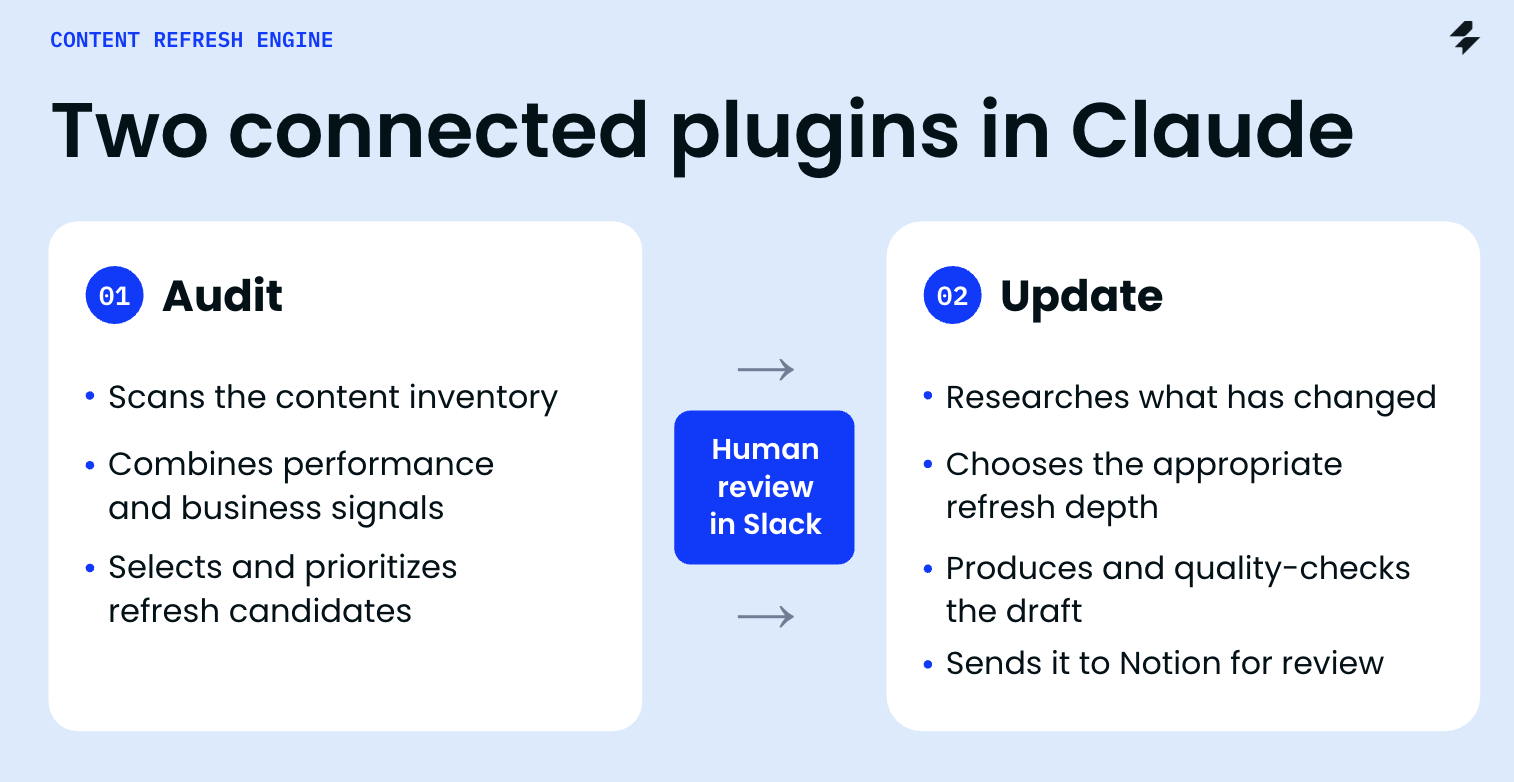
The architecture: one Claude plugin with two skills inside a human approval gate between them.
-
The data the agent needs and where it comes from.
-
How the audit picks pages (and why Slack channels are part of the signal).
-
How the update stage chooses refresh depth and protects what already works.
-
The 8-week measurement loop and the results so far.
-
A lighter version you can set up this week, with a starter prompt.
Why does content refresh break down at scale?
Content refresh breaks down because the signal that a page needs work usually shows up after the damage is done. By the time clicks drop in GSC, the page has often been outdated for months.
Our blog has almost 500 published articles. Running a content audit and reviewing them by hand meant pulling rankings, checking GSC trends, scanning SERP competitors, and comparing each page against what changed in the product. That took days per batch, so refreshes happened reactively.
The harder case is the page that looks healthy. It ranks well, and traffic is stable, yet it describes an old version of the product or skips features we launched last quarter. Performance data alone will never flag it.
There is a second trap. When a page does get picked, the instinct is to rewrite it. If that page already ranks, changing everything for the sake of freshness can do more harm than good.
So we needed a system that does two things well: spot pages that need attention early, and update only what actually needs updating.
What is an AI content refresh engine?
An AI content refresh engine is a workflow where AI agents audit your content inventory and prepare review-ready updates for the pages worth refreshing. People approve the plan and publish the result.
Ours runs in Claude as two connected plugins:
- Content Audit analyzes the available signals, selects up to five priority pages, and recommends whether to refresh, leave alone, merge, or prune each one.
- Content Update takes an approved plan, chooses how deep the update should go, and produces a draft ready for editorial review.
A human approval gate in Slack sits between the two. The agent never publishes directly to the live blog. The final editorial review and publication remain human responsibilities. After publishing, a measurement loop checks whether the update worked.
What do you need to build an AI content refresh workflow?
You need an AI agent, live access to your SEO and AI visibility data, and two shared workspaces: one where the content inventory lives and one where the team approves work.
Here is our stack and what each part does.
Role in the workflow
Runs both skills: reads the inventory, analyzes signals, writes the digest and the draft
Role in the workflow
Live rankings, SERP competitors, SERP features such as AI Overviews, AI visibility, backlinks
Role in the workflow
Clicks, impressions, queries, and CTR per URL
Role in the workflow
In our case, we use it to extract business-related metrics. You can use the tool that works for you
Role in the workflow
Scrapes the current page and competitor pages for the research bundle
Role in the workflow
Content inventory, review-ready drafts, and measurement results
Role in the workflow
Context channels, the approval gate, and completion notices
Runs both skills: reads the inventory, analyzes signals, writes the digest and the draft
Live rankings, SERP competitors, SERP features such as AI Overviews, AI visibility, backlinks
Clicks, impressions, queries, and CTR per URL
In our case, we use it to extract business-related metrics. You can use the tool that works for you
Scrapes the current page and competitor pages for the research bundle
Content inventory, review-ready drafts, and measurement results
Context channels, the approval gate, and completion notices
The piece that ties it together is MCP, which lets AI assistants like Claude connect directly to external tools and data. Instead of exporting CSVs and pasting them into a chat, the agent queries SE Ranking itself.
This is already how many SE Ranking users work: 1 in 2 SE Ranking MCP users use it weekly, and 1 in 3 use it daily.
Step 1: Build a content inventory the agent can read
The workflow starts from a structured blog inventory in Notion, with one row per article and its key performance data attached. This gives the agent a reliable starting point without pulling fresh data for every URL on every run.
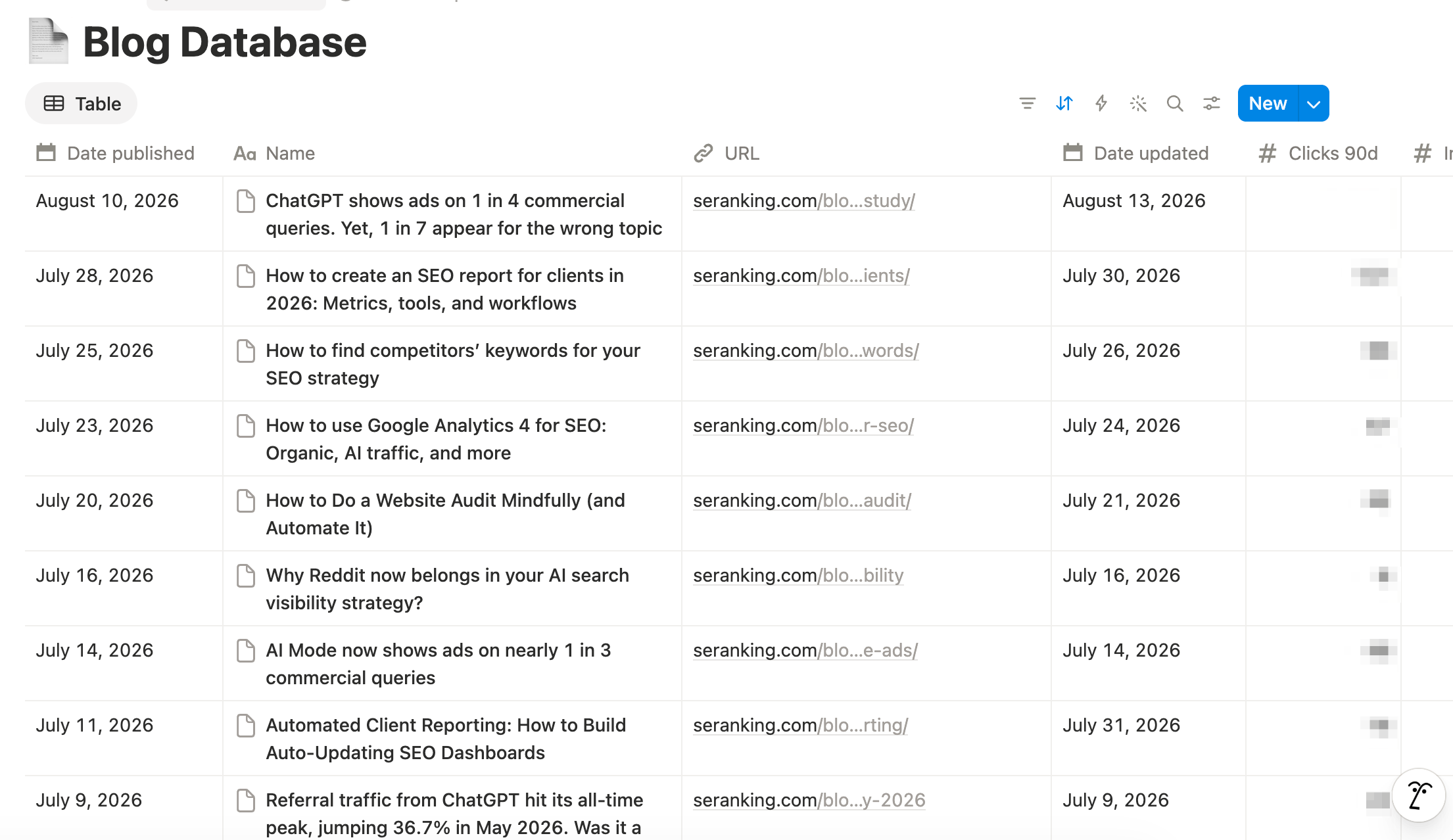
We chose Notion because it connects natively with Claude, so the agent can read and write rows without extra setup. A spreadsheet works too if that’s where your team lives.

Step 2: Decide how the agent should run
Before the agent touches a single page, decide when it runs, what it looks at, and how much it is allowed to send back. This is one of the most important setup decisions in the whole workflow, because it determines whether the audit fits your team’s editorial rhythm or floods it with recommendations nobody has time to act on.
There is no universal setup. Define your run scenarios by answering several questions for your own case:
- Trigger: what starts a run? A schedule, an event, a product update, or a person asking.
- Scope: what does the agent review? The whole inventory, one topic cluster, or specific URLs.
- Output cap: how many recommendations can your team realistically review and act on per run?
We settled on two main modes that share the same audit funnel:
Input
All blog pages
What happens
The agent scans the database and narrows it to a maximum of 5 priority candidates
Input
1 to 10 URLs
What happens
Skips the inventory scan and goes straight into detailed analysis
All blog pages
The agent scans the database and narrows it to a maximum of 5 priority candidates
1 to 10 URLs
Skips the inventory scan and goes straight into detailed analysis
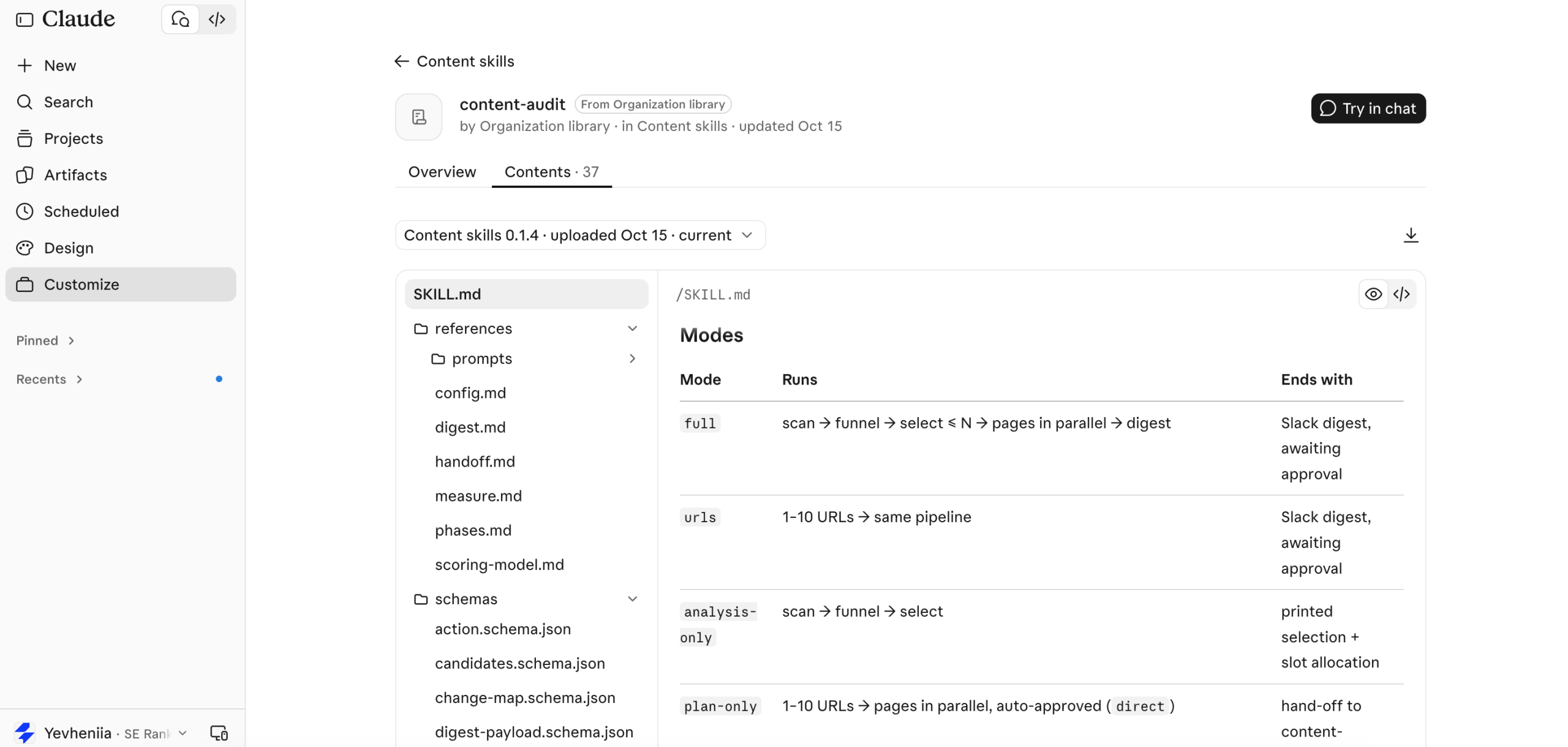
Then you need to create clear instructions on what each mode means, how it runs, and what it takes into account. On this below.
Step 3: Gather the evidence and pick the candidates
The audit works in two passes. The first ranks every page in scope using the inventory and the team’s context signals. The second builds a full, live picture of the shortlisted pages only, which keeps runs fast and data usage proportional.
Pass 1: Rank pages on performance and context
Performance signals come from the inventory:
- SEO performance: clicks, impressions, CTR, rankings
- AI visibility: whether AI engines cite the page
- Business metrics: MQLs, revenue tied to the page, etc.
- Content freshness: time since the last update
Context signals come from Slack: our SEO news channel, our product updates channel, and wider market and search changes the team shares there.
The context stream is what catches the healthy-looking page. If the product team announces a new feature in Slack, the audit can flag every article that describes the old flow, even while that article still ranks.
Pass 2: Build a full picture of each shortlisted page
For the shortlist, the agent stops relying on the inventory snapshot. Using the connectors from the stack above, it pulls:
- Live positions, top 10 SERP competitors, SERP features such as AI Overviews, and AI citations for related prompts (SE Ranking & SE Visible MCP)
- Current queries, clicks and CTR trends (Google Search Console)
- The page as it reads today, plus the competitor pages ranking above it (Firecrawl)
- The Slack threads that flagged the page and the materials linked in them
The analysis happens in the comparison. The agent reads the current page against everything else and asks concrete questions. Does the article still describe the product flow correctly after the latest release? Do the pages outranking it cover a subtopic it skips? Are people reaching it through queries it never answers? And recommends how to refresh it.
Step 4: Add a human gate to the workflow
Based on all of this, our agent sent a digest to a dedicated Slack channel. Each recommendation explains the selected page, the evidence, the proposed refresh depth and the exact scope of changes.
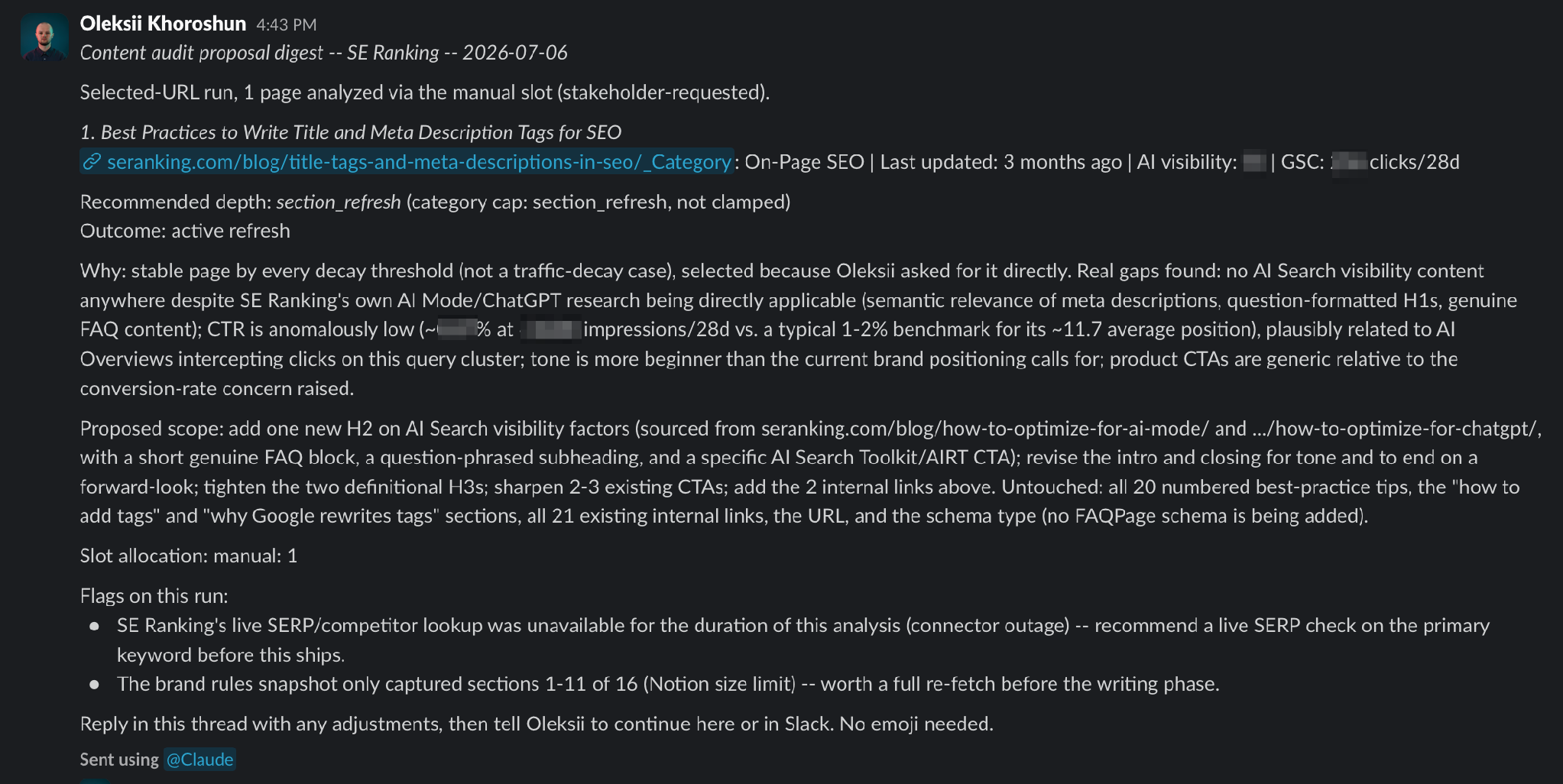
The digest is the review gate. The team replies in the thread with comments or extra context, then picks one of three paths: Approve, Adjust scope, or Stop. Any team member can comment on the brief thread, and it’ll get picked up by the workflow, so it’s also a collaboration point for the team. Once approved, we tell Claude to re-fetch the thread, incorporate the feedback and continue with the update.
Step 5: Turn the approved plan into a review-ready draft
After approval, the Content Update plugin takes over. It gathers what a writer would need, confirms how much of the page to change, and drafts and checks the update before a human sees it.
Gather the research bundle
Nobody starts from a blank page. Most of the evidence was already collected during the audit (Step 3). The update stage refreshes it and adds what the team said in the Slack thread, so the bundle includes:
- The current page as it lives on the blog
- The original audit and every comment added in the Slack thread
- Fresh SERP and competitor research for the target keywords
- Relevant product and industry updates
- Gaps the agent found across AI answers on the topic
Confirm the refresh depth
Refresh depth is the scope of an update, from a new meta title and meta description to a full rewrite. The plugin confirms the depth the audit proposed before writing anything.
When it fits
Rankings are stable but CTR is low
When it fits
A specific claim, step, or screenshot is out of date
When it fits
A subtopic is missing or one section no longer reflects the market
When it fits
The product changed fundamentally or the search intent shifted
Rankings are stable but CTR is low
A specific claim, step, or screenshot is out of date
A subtopic is missing or one section no longer reflects the market
The product changed fundamentally or the search intent shifted
Whatever the depth, only the approved sections are rewritten. They are then merged back into the live structure of the page, so headings, links, and formatting outside the scope stay exactly as they were.
Draft, then run the quality loop
Every draft passes four checks before a human sees it:
- Fact-checking: product claims and figures are verified against current sources
- Editorial rules: structure, formatting and SEO requirements from our style guide
- Brand voice: tone and language rules for our content
- Preservation checks: confirms nothing outside the approved scope changed
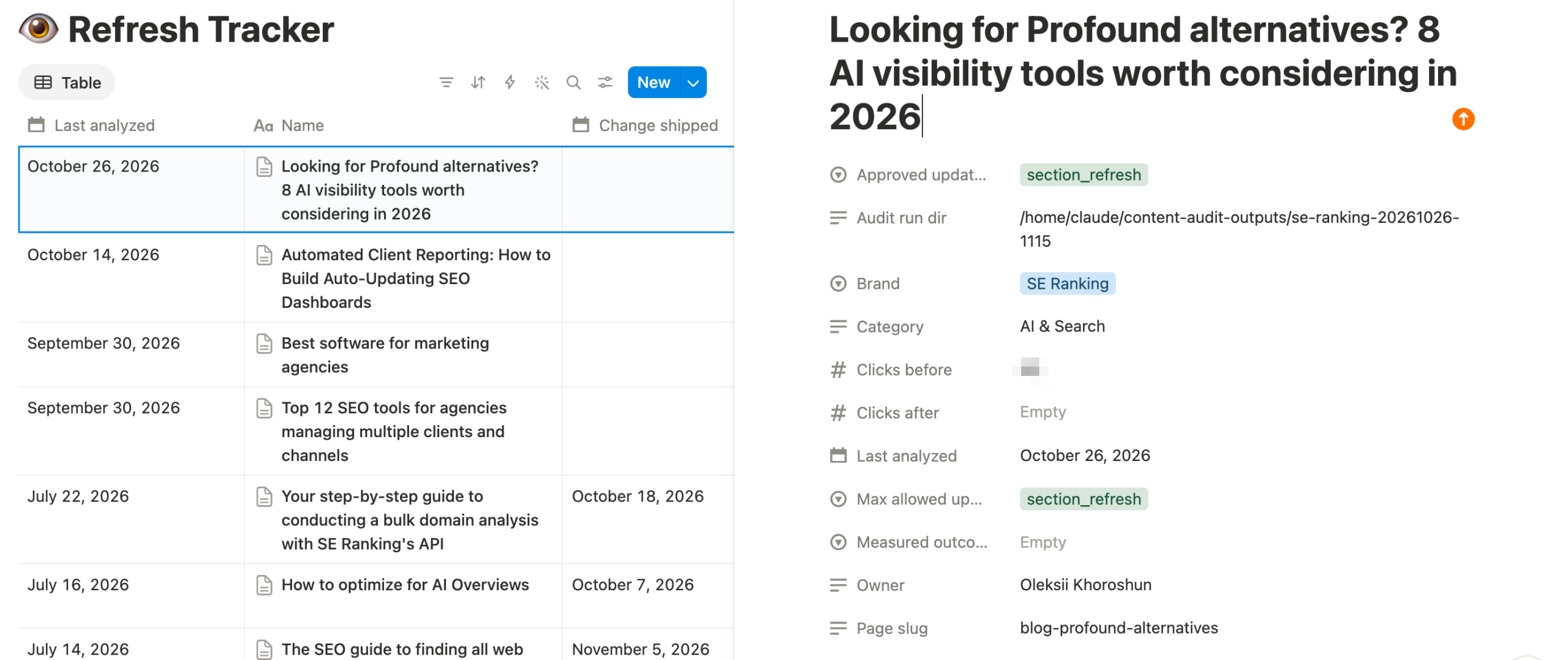
When the loop passes, the workflow posts a completion notice in the original Slack thread and creates a review-ready page in a dedicated Notion database. Along with the updated content, each page explains why it was selected, what changed, what was added, and what deliberately stayed untouched.
What’s next?
This is where the automation stops and a human goes and reviews the suggested updates, edits them, and then publishes them (by the way this step can also be automated).
But we’ve added one more important step to our agent.
About eight weeks after a human publishes the update, the workflow pulls fresh data and compares it against a baseline recorded on publication day. Without this step, you never learn which kinds of refresh actually pay off.
When the page goes live, the workflow records what changed and the metrics at that moment. At the eight-week mark, it rechecks:
- GSC clicks, impressions and average position
- Rankings on the target keywords
- AI visibility: whether the page gained or lost citations in AI answers
There are two outcomes:
- If the page recovered or improved, the result is recorded.
- If it didn’t, the workflow recommends a stronger refresh or a reassessment of the page.
Either way, the result is written back to Notion.
Over time, that log becomes the most valuable part of the system. It shows which types of changes move performance, which barely register, and where the refresh strategy should evolve next.
What has the AI content refresh workflow changed for our team?
The biggest change so far is time. We asked the team to estimate how much manual work the workflow takes off their plate on tasks they do regularly:
Estimated time saved
Up to 80%, depending on how many technical and product details need checking
Estimated time saved
About 80%, depending on how big the update is
Estimated time saved
About 60%
Up to 80%, depending on how many technical and product details need checking
About 80%, depending on how big the update is
About 60%
These are team estimates rather than time-tracked figures, and we’ll update this section as the measurement loop produces performance data.
Where should humans stay in the loop?
Humans stay in charge of every decision that changes what readers see: approving the plan, reviewing the draft and publishing it. The agent’s job is to make those decisions faster and better informed.
The reason is simple. Confidence is not correctness. If one number in the input is wrong, a model can still build a perfectly logical recommendation around it, and it won’t necessarily stop to tell you the number looks suspicious.
So every output gets checked against the source data:
- If the agent says traffic declined, check the period and filters it used.
- If it reports a ranking loss, confirm the location, device and keyword set.
- If it says a competitor is cited more often, verify the prompts, engines and source URLs behind that claim.
How to start with our AI content refresh plugin this week
We packaged a simplified version of this workflow as an open-source Claude plugin, content-refresh. It keeps the thinking behind our internal pipeline (diagnose first, propose the lightest fix, lock what already works, wait for a human) and drops the infrastructure.
There are no databases or Slack channels: everything runs in chat and plain files.
What do you need?
- SE Ranking MCP: all plans include API and MCP access.
- Firecrawl connector: for scraping your pages and competitor pages. Occasional audits fit the free tier.
- GSC MCP (optional): if you have one connected, the audit uses real clicks, impressions, CTR and position for the exact page, and checks indexing before recommending a rewrite.
Connect SE Ranking and Firecrawl in Claude’s connector settings. The SE Ranking MCP setup guide covers every supported client.
Once the loop proves itself on a handful of pages, add the pieces that make it run at scale for us: a content inventory, context from Slack, a scheduled run and a measurement log.
Not using plugins? Start with this audit prompt:
You are a content auditor for [brand]. Audit these URLs: [1 to 10 URLs].

For each URL:
Pull current rankings, top SERP competitors, and AI visibility from SE Ranking.
Pull 90-day clicks, impressions, CTR and average position from Google Search Console.
Check the page against these recent product and industry changes: [paste notes].
Recommend one outcome: refresh, leave alone, merge, or prune.
If refresh: recommend a depth (metadata / heading or paragraph / section / full rewrite).

Return for each page:
Why now (evidence only, with numbers)
Proposed scope (what changes)
Untouched (what must stay exactly as it is)
Flags (any data you could not retrieve or verify)

Do not rewrite anything yet.
Turn your content inventory into a refresh queue
The content refresh engine didn’t start as a grand automation project. It started with one question: which pages need our attention, and why? Once the data was connected through MCP and the agent could read it, the answer stopped taking days.
This setup works for our team, and it took a few iterations to get here. We hope it shows that a workflow like this is within reach for yours too. Start small, keep a person at every decision point, and add more data and automation as the results earn your trust.
FAQ
How often should you refresh blog content?
Refresh based on signals, not a calendar. Our audit flags pages when performance drops, when product or market context changes, or when a page falls behind its SERP competitors. We then measure each update about eight weeks after publishing.
Signals still benefit from a minimum cadence, especially for pages you want AI engines to cite. In SE Ranking’s ChatGPT citation study, content updated within the past three months averaged 6 ChatGPT citations, compared with 3.6 for outdated pages. A quarterly check is a sensible floor for those pages.
Google core updates are another reason to run an audit. After the May 2026 core update, 88.39% of TOP 10 URLs changed positions, and 19.87% of pages that had ranked in the TOP 10 dropped out of the TOP 100 entirely, according to SE Ranking’s core update analysis. Re-running the audit once an update finishes rolling out catches those drops before they settle in.
Can AI publish content updates automatically?
Technically yes, but we don’t let it. The agent prepares review-ready drafts in Notion, and an editor reviews and publishes every one. Model output can sound confident while resting on a wrong number, so a human check before publishing is part of the design.
What data do you need to automate a content audit?
At minimum: URL, last updated date, clicks, and target keyword per page, plus live access to rankings through a tool like SE Ranking’s MCP. Impressions, CTR, AI visibility, backlinks and business metrics make prioritization sharper as you add them.
Does refreshing content improve AI visibility?
It helps, though it’s one factor among several. In SE Ranking’s AI Mode study, pages updated within the last two months averaged 5.0 AI Mode citations, compared with 3.9 for pages left untouched for over two years. The same study found that a domain’s overall traffic mattered more than any single content factor, so a refresh works best on pages from a site AI engines already trust. That’s why our audit checks AI visibility for each page and the measurement loop tracks it again after publishing.