Build a connected data ecosystem
SE Ranking integrations link your analytics stack, reporting tools, and automation workflows to give you a cross-channel picture to act on.
Your visibility data lives in silos
Bring your SEO, traffic, social, and LLM visibility data into one place
Your reports tell part of the story
Turn cross-channel data into a unified report you can reason from
Your workflows still run on exports
Move from manual data pulls to workflows that run without you
Work on top of SE Ranking with API
Access the SE Ranking dataset directly. No UI constraints or template limitations. Just the data, ready to plug into whatever your operation requires.
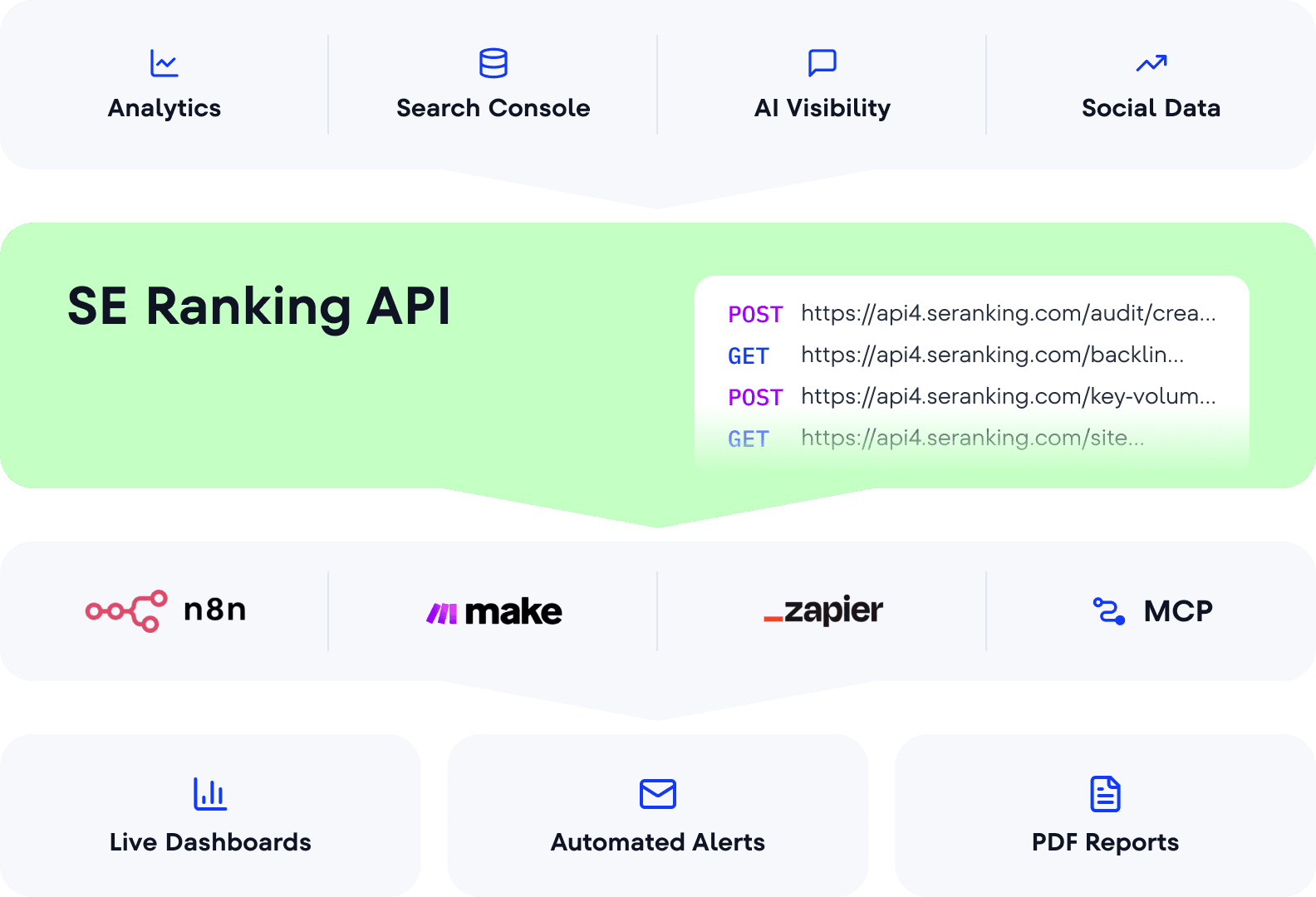
Full data access
Pull every data point SE Ranking tracks directly into your own tools
Custom dashboards
Build reports that reflect your logic, clients’ priorities, and the team’s workflow
Automation at scale
Run complex, recurring workflows across dozens of projects without manual intervention
MCP integration
Link SE Ranking to AI chatbots via MCP and get live SEO data in Claude, ChatGPT, or Gemini
All SE Ranking integrations, in one place
Connect the tools your team already relies on, across multiple layers of your marketing operation.

Google Analytics 4
Connect GA4 to your SE Ranking projects to see the real impact of your optimization efforts.
Correlate visibility with traffic, sessions, and conversions
Understand which actions drive business outcomes
Give stakeholders a fuller picture of brand performance
Google Search Console
Merge GSC with SE Ranking to get a more complete view of how your pages perform in search.
Compare GSC impressions and clicks against keyword positions
Identify gaps between ranking potential and search performance
Spot high-impression, low-click pages worth optimizing
Google Ads
SE Ranking pulls Google Ads data to give you visibility into competitors’ paid campaigns.
See which keywords competitors are bidding on and what their paid traffic looks like
Analyze competitor ads and patterns to inform your own strategy
View paid and organic performance side by side for a clearer picture of competitor search visibility
Matomo Analytics
Integrate Matomo with SE Ranking for privacy-first analytics without depending on Google’s data.
Connect Matomo traffic data to your SE Ranking projects
Maintain full data ownership while tracking SEO performance impact
Build cross-channel reporting without routing data through Google
Data Studio
SE Ranking’s Data Studio (formerly SE Ranking’s Data Studio) integration pulls your data directly into customizable dashboards.
Pull rankings, audit data, and keyword metrics into your dashboards
Access AI search visibility datasets with prompt-level data and share of voice
Build client-ready dashboards that refresh automatically

Whatagraph
Bring SE Ranking data into Whatagraph to create custom, multi-channel client reports.
Blend SE Ranking metrics with data from other channels using AI-assisted report creation
Build branded, client-facing reports that update automatically across your portfolio
Transfer SE Ranking data to BigQuery for deeper analysis and long-term storage

Agency Analytics
Pull SE Ranking keyword data into AgencyAnalytics and deliver white-label client reports.
Track keyword movements and position distribution across clients in one dashboard
Compare client rankings against competitors to surface strategic opportunities
Break down performance by region and search engine for cross-market clients

Reportz.io
Connect SE Ranking to Reportz.io and turn keyword rankings into real-time client dashboards.
Pull daily and monthly rankings across Google, Google Mobile, and Bing
Include keyword grouper metrics to give clients a structured view of ranking performance
Deliver white-label, dashboard-based client reports that update automatically

Zapier
Connect SE Ranking’s Lead Generator to other apps via Zapier and automatically route new leads to the tools your team already uses.
Push new leads from SE Ranking's Lead Generator to your CRM, email platform, or project management tool
Set up trigger-based workflows that fire the moment a new lead comes in
Connect SE Ranking lead data to Zapier’s ecosystem without coding

Make.com
Automate SEO & GEO workflows with Make’s visual, no-code scenario builder based on SE Ranking’s data.
Use the SE Ranking SEO Data app to monitor backlinks, keywords, competitor ads, and brand visibility in LLMs, and send data to your tools and dashboards
Use the SE Ranking Project app to automate rank tracking, website audits, and client reporting across your projects without writing code
Connect to Google Sheets, Slack, your CRM, and hundreds of other apps using ready-made templates or custom workflows

n8n
Build custom SEO workflows with n8n’s visual workflow builder, using a native node built and verified by SE Ranking.
Pull rankings, backlinks, keyword research, domain analysis, website audits, and AI search data from SE Ranking into any n8n workflow
Pair SE Ranking data with AI agents and analytics tools to run multi-agent domain audits, keyword research, and competitive analysis
Schedule recurring SEO pipelines across multiple clients or domains without manual intervention
Appy Pie Automate
Connect SE Ranking to 450+ apps via Appy Pie Automate using a no-code, drag-and-drop workflow builder.
Set up instant trigger-based workflows that fire the moment an event occurs in SE Ranking
Route SE Ranking data to CRMs, Slack, email, spreadsheets, and other tools
Build and activate automations without writing a single line of code
Google Business Profile
Connect your GBP to SE Ranking and track how users find and interact with your local listing.
See how users discover your profile: direct search, discovery search, or branded search
Track impressions, clicks, direction requests, phone calls, and photo views over time
Edit your profile, manage and respond to reviews directly from SE Ranking

Connect your Facebook listing to SE Ranking to monitor status and manage local presence.
Monitor listing accuracy and flag errors across your Facebook business profile
Manage and respond to customer Facebook reviews from SE Ranking
Keep your local presence consistent alongside your other business profiles

Apple Business Connect
Connect Apple Business Connect to SE Ranking to maintain accurate local data across Apple Maps.
Monitor listing status and surface errors before they affect local visibility
Manage and respond to reviews on Apple Maps from within SE Ranking
Keep your Apple presence consistent with your broader local marketing strategy

Bing Places
Connect Bing Places to SE Ranking to extend local presence tracking beyond Google.
Monitor listing status and identify errors on Bing without logging into a separate platform
Manage and respond to reviews on Bing Places directly from SE Ranking
Track your local visibility across multiple search engines from one place

Wix
Access SE Ranking’s keyword research and competitive intelligence tools directly from your Wix dashboard.
Research keywords by volume, difficulty, intent, CPC, and competition from within Wix
Find your competitors’ top-performing keywords and add them to your list
Discover similar, related, and long-tail keyword variations in your target market

WordPress
Export articles from SE Ranking’s Content Editor directly to WordPress.
Set post status, author, category, and publication date at the point of export
Connect multiple WordPress domains and update existing posts as well as create new ones
Track published article analytics back in the Content Editor after export
Search, AI visibility, and social — three layers of one ecosystem
Tracking each layer separately is how signals get missed. Connected data helps find correlations and show a more coherent brand picture
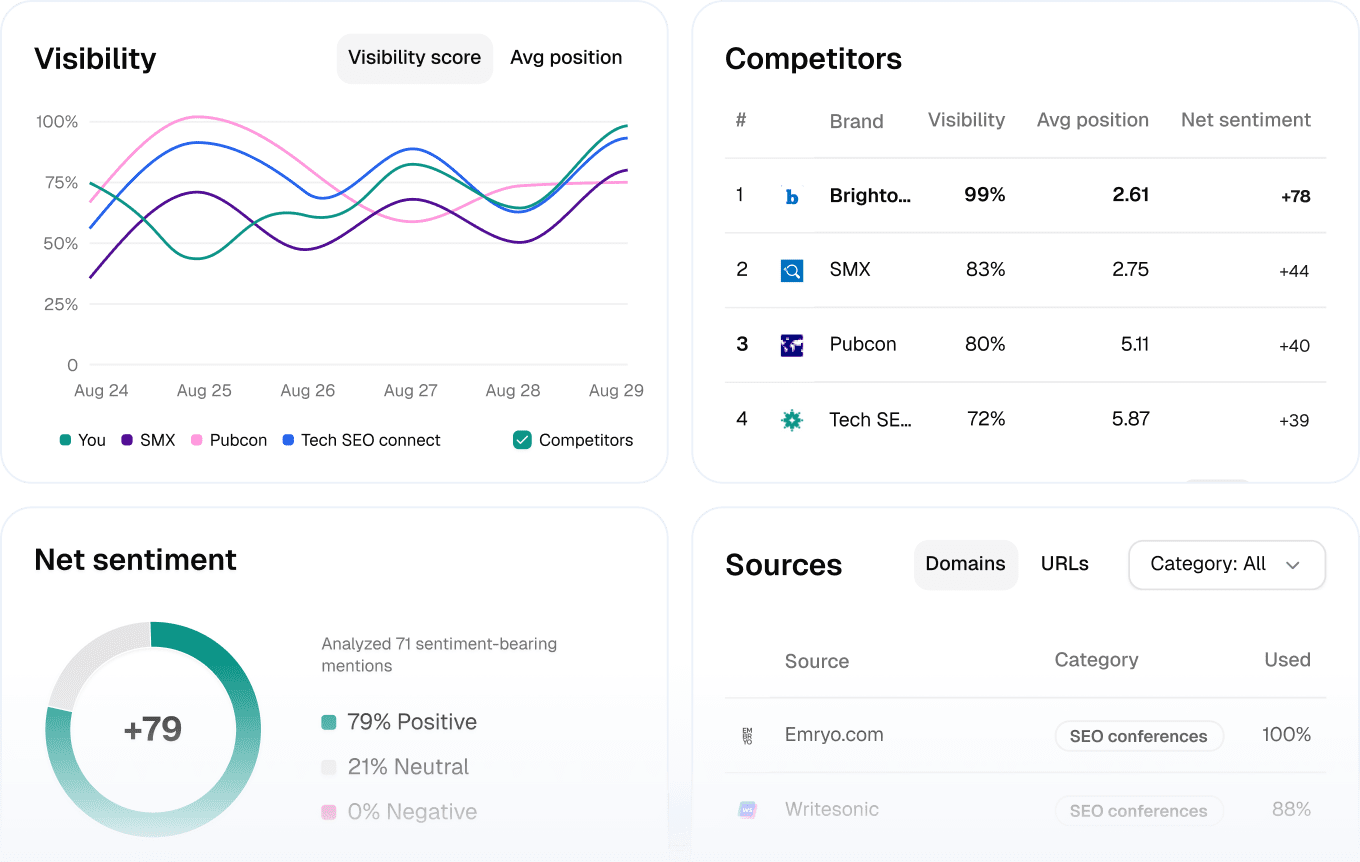
SE Visible
Monitor your LMM presence strategically and grow AI brand visibility in your niche
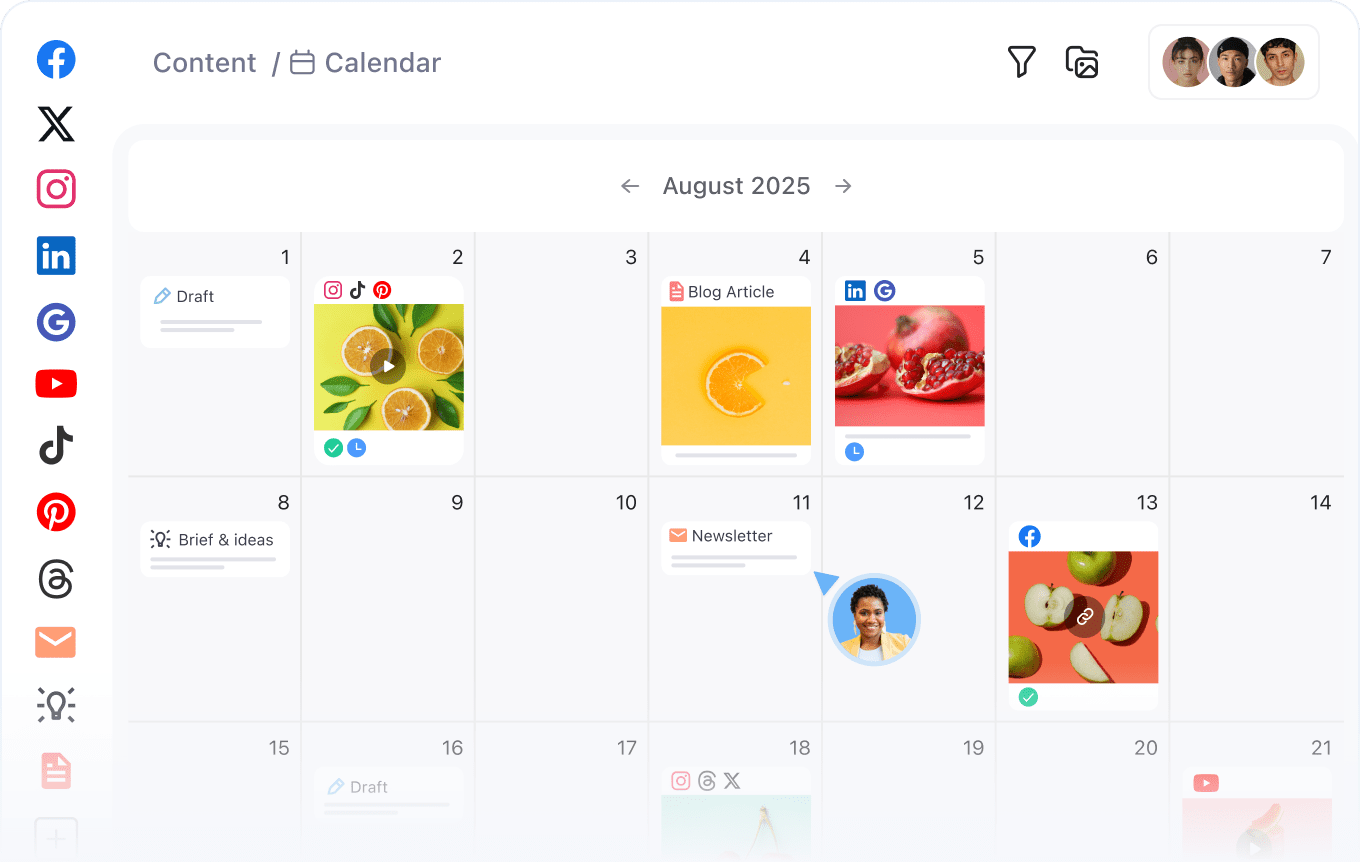
Planable
Add social tracking to your visibility picture with collaborative content planning and analytics
How teams are putting SE Ranking integrations to work

SE Ranking’s tools—and especially the API—are an integral part of our daily workflow. They not only provide us with accurate data for SEO analysis but also enable a deeper integration of SEO and SEA insights. This creates measurable synergies that translate into real performance gains—and directly impact our clients’ revenue.

Our biggest challenge was reporting. We prefer to use Looker Studio for our reports as we integrate other platforms. However, very few platforms had a good Looker Studio link. In addition, it was frustrating seeing other tools get more expensive yet failing to add other benefits to their services.
Your data works better when it moves together
Start a free trial to explore SE Ranking and its integrations. Connect your analytics stack, reporting tools, and automation workflows.
What integrations does SE Ranking support?
SE Ranking integrates with:
- Analytics platforms like GA4, Google Search Console, Matomo Analytics.
- Reporting tools, including Data Studio, Whatagraph, AgencyAnalytics, Reports.io.
- Automation platforms: Zapier, Make.com, n8n, Appy Pie.
- Google Business Profile, Facebook, Apple Business Connect, Bing Places.
- Website builders like WordPress and Wix.
The SE Ranking’s MCP for SEO also allows teams to build custom integrations with AI assistants.
How do SE Ranking SEO integrations work?
Depending on the integration type, SE Ranking data can be pulled via a native connector (as in Data Studio), through an automation platform (Make.com, n8n, Zapier), or directly via the SE Ranking API. The MCP server for SEO lets AI agents access SE Ranking data in real time.
Can I create unified reports with SE Ranking integrations?
Yes. SE Ranking connects to Data Studio, Whatagraph, AgencyAnalytics, and Reports.io, so you can combine SEO data with traffic, paid performance, and other channel data in a single reporting view. The Data Studio integration is particularly suited to agencies building multi-client dashboards.
Does SE Ranking support Data Studio (Looker Studio)?
Yes. SE Ranking’s Data Studio integration connects your rank tracking, keyword research, AI visibility, and site audit data directly to your dashboards. No manual exports required.
Can I automate SEO workflows with SE Ranking?
Yes. SE Ranking integrates with Make.com, n8n, Zapier, and Appy Pie. This lets you build automated workflows that pull SEO data, trigger actions based on changes, and connect SE Ranking to other tools in your stack. Common use cases include automated audit alerts, scheduled keyword research pulls, and multi-tool reporting pipelines.
Does SE Ranking have an API?
Yes. The SE Ranking API provides programmatic access to the platform’s dataset, including rankings, site audits, backlink data, keyword metrics, and AI visibility data. It’s designed for teams running custom reporting, large-scale automation, or building their own data pipelines on top of SE Ranking’s data.
What is the SE Ranking MCP server?
The SE Ranking MCP server connects SE Ranking’s SEO data to AI assistants like Claude, ChatGPT, and Gemini. This way, you can access domain analysis, keyword research, backlinks, SERP data, and AI search insights directly via prompts, without exports, filters, or JSON parsing.
How does MCP work for SEO?
MCP is an open standard that lets AI models connect to external data sources. With the SEO MCP, you describe what you need in plain language and your AI assistant fetches the data, interprets it, and delivers structured insights directly in the chat. No manual setup, no platform switching.
What can I do with MCP in SE Ranking?
You can run keyword research, domain analysis, backlink monitoring, SERP analysis, and extract AI search visibility queries. Practical use cases include clustering and cleaning keyword lists via prompt, analyzing SERP overlap with AI Overviews, identifying competitor topic gaps across LLMs, and generating content briefs without exporting data. It’s useful for SEO professionals and non-SEOs alike to get live SEO answers without relying on the platform’s filters or an SEO team’s help.
Can I use MCP with ChatGPT, Claude, or Gemini?
Yes. The SE Ranking MCP server works with MCP-compatible AI environments, including Claude, ChatGPT, and Gemini. Once connected, you can query SE Ranking data directly inside your AI assistant and get structured, human-readable insights from live data without leaving your workflow.
Break the silos between your data and workflows
Replace scattered data with a unified visibility picture your team can work from