Content automation for SEO: how to build a workflow that scales
Most SEO content automation is measured by volume. Teams track posts shipped and hours saved while rankings slip. That’s a production metric for a strategy problem.
According to HubSpot’s State of Marketing 2026, 80% of marketers use AI for content creation. Most are optimizing for speed. But if your rankings are slipping, output usually isn’t the issue. Content automation for SEO works only when signals that should decide what gets automated (keywords, SERP data, AI search visibility) actually make it into the workflow.
-
Automate the production, not the judgment.
Tools handle the repeatable work, keyword pulls, briefs, drafts, metadata, tracking, but the calls that decide whether a piece is worth publishing stay with a person.
-
Sequence the workflow from search demand inward.
Automation that runs without keyword, SERP, and AI-visibility signals deciding what gets made just produces the wrong things faster.
-
Start with one pipeline, not the whole stack.
Audit your workflow, automate a single pipeline end to end, set your editorial standards, then close the feedback loop.
-
A workable stack is two layers: an orchestrator and live data.
Claude or n8n/Make run the steps; MCP connectors (SE Ranking, GSC, GA4, Notion) feed them current data on demand.
-
A pipeline runs whatever you feed it,
so stale data becomes hallucinated facts, a loose brief becomes inconsistent voice, and weak topics get produced faster. Ground generation in live, verified data and keep a review gate before anything publishes.
What is SEO content automation?
SEO content automation is the process of running the repeatable steps in content production through specialized tools. They handle the routine tasks with defined inputs and predictable outputs, while the judgment-heavy work stays with your team.
The catch is scope. The production lifecycle holds more automation candidates than a first-pass audit usually surfaces. Drafting is the obvious one, but briefing, internal linking, metadata, formatting, repurposing, and performance tracking all qualify. Most teams automate one or two and assume they’ve covered the category.
It also sits upstream of marketing automation, which governs how content reaches audiences through channels like email and paid media. Content automation handles what gets made and structured before any distribution decision happens.
Can SEO content be automated?
Partly. You can automate most of the production work, but not the decisions that determine whether a piece is worth publishing. Take out the human review gate, and automation can go out of control.
An automated pipeline runs whatever you feed it, and it scales mistakes as efficiently as everything else. The faster it moves, the more it matters that a person checks what it proposes before anything publishes.

What automation handles, and what stays human
The tasks SEO content automation handles well are those with defined inputs and predictable outputs:
- Creating content briefs based on the SEO or product data
- First-draft generation from a keyword brief or outline
- Meta title and description variants at scale
- Performance metrics collection and triggers that fire from it
What it does not replace is the reasoning layer. The calls that stay with your team include:
- Whether a topic is worth pursuing in the first place
- Whether it serves the business goal you’re writing toward
- Whether you stand a real chance of ranking for it
- Whether a finished draft has read search intent correctly
- Whether the piece says something you actually want associated with your brand
How SEO content automation works across the content lifecycle
SEO content automation runs across five connected stages. Each runs on its own category of tool, but the stages only produce useful output when you sequence the workflow from search demand inward:
- Topic discovery and keyword research
- Brief and structure creation
- Content generation
- Publishing
- Performance tracking and iteration
Stage 1: Topic discovery and keyword research
At this stage, your automation collects:
- Search volume and keyword difficulty
- Question-based queries surfaced from PAA
- Related terms and semantic clusters
- SERP competitors with their intent and traffic estimates
- SERP features presence
- AIO presence and related metrics
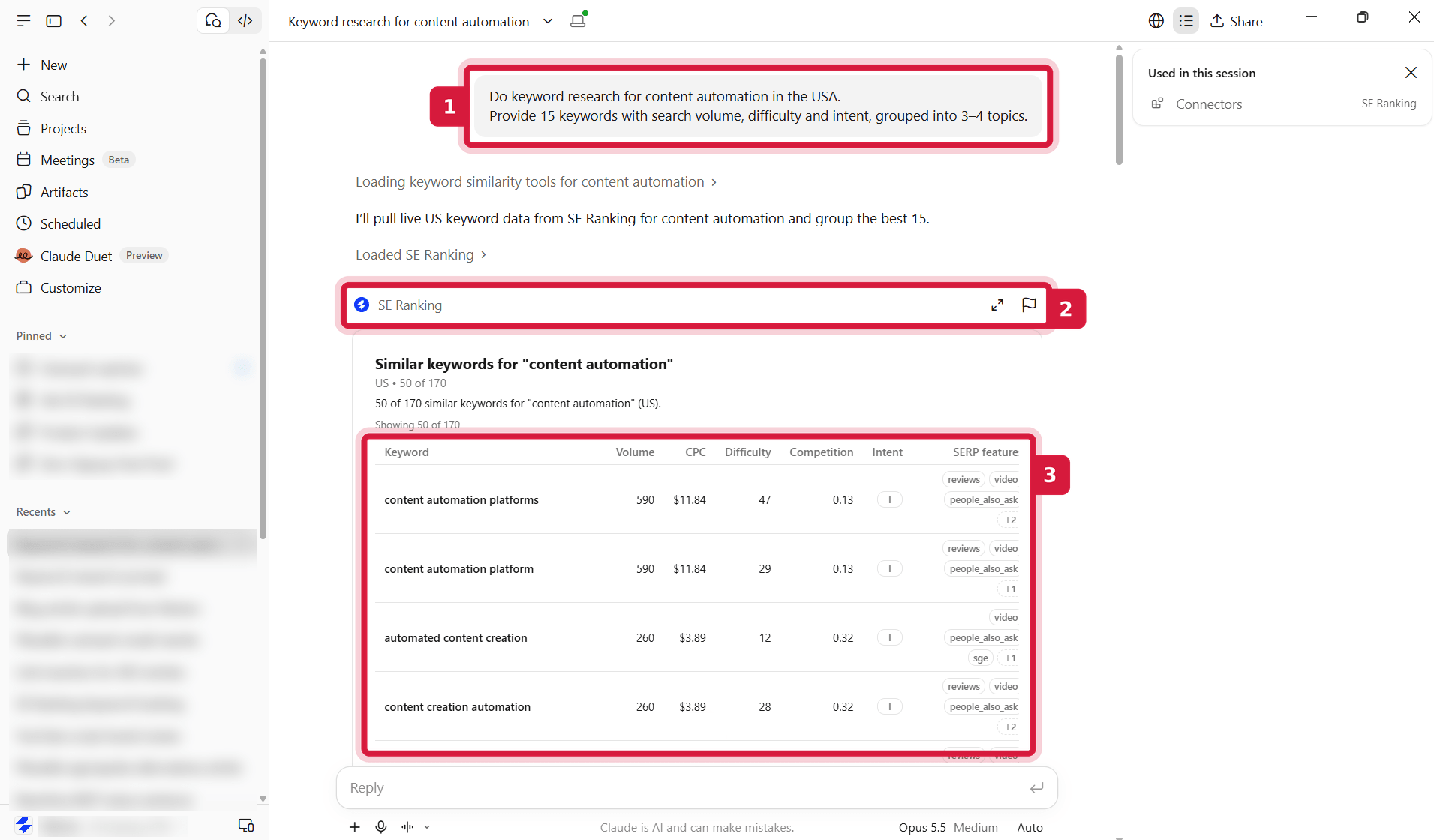
But pulling that data is only half the stage. Before a topic goes live, a few checks stay with your team:
- Whether you already cover it, and risk cannibalizing a page that already ranks
- Whether the search intent matches what you can credibly publish
- Whether it’s a topic where your product or service genuinely fits
Stage 2: Brief and structure creation
Once a topic clears those checks, a content automation workflow turns the target keyword into the structural inputs:
- Headings structure pulled from top-ranking pages
- Keywords and entities to cover, plus the topical gaps competitors leave open
- Suggested word count benchmarked against the SERP
- Internal linking based on GSC data
- Additional analysis of AIO so the brief targets what it takes to appear there
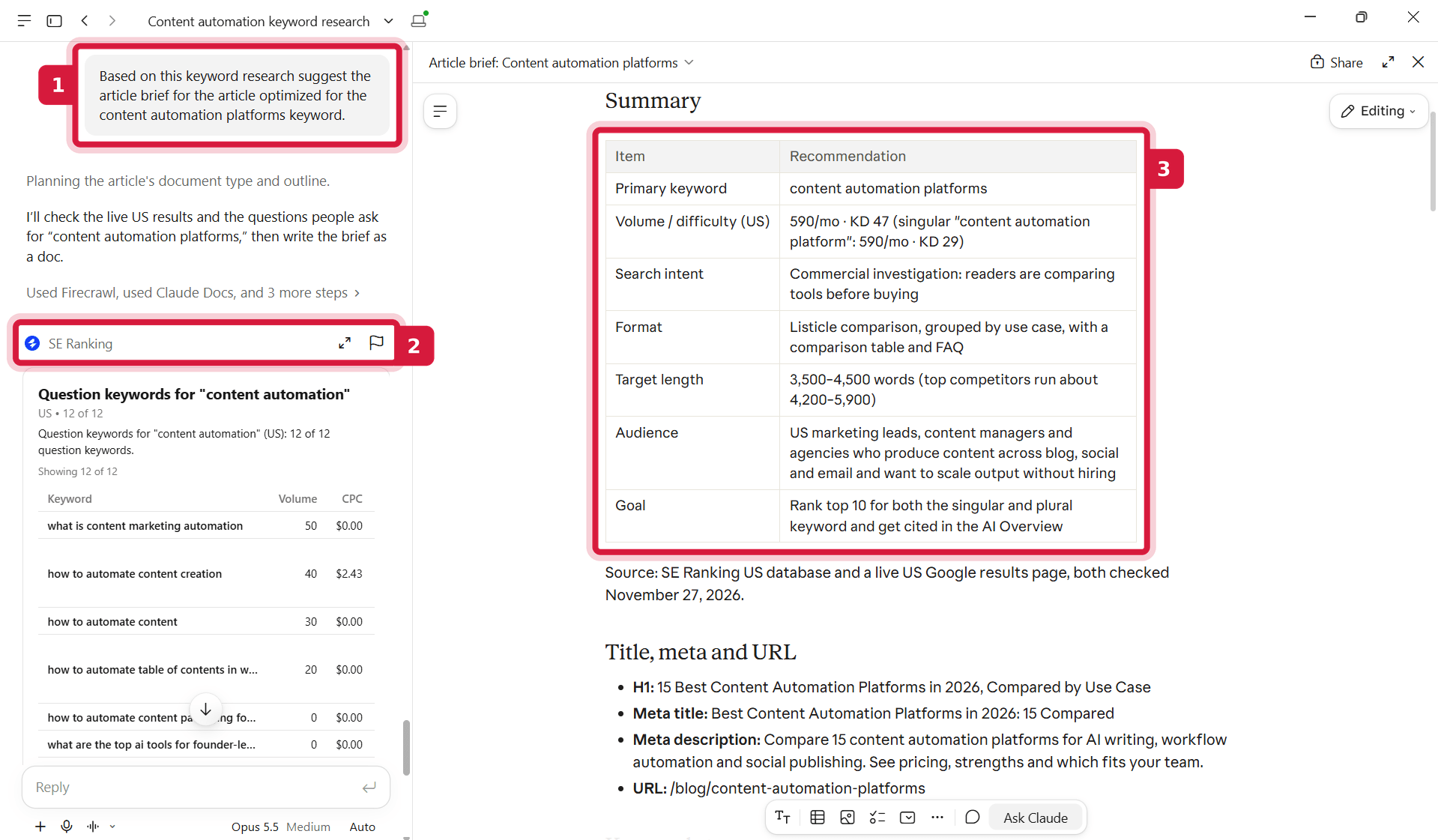
This is the crucial place a human gate belongs. Before the brief moves to drafting, someone should review it: is the structure logical, does it cover what the topic actually needs, does it align with your vision and the goal you’re writing toward? The payoff is direct. The clearer and more accurate the brief, the better the draft that comes out of the next stage.
Stage 3: Content generation
This is where AI writing tools draft copy from the approved brief.
There’s no single way to run this stage. The right setup depends on your stack, and approaches range from a single prompt to a full multi-agent pipeline.
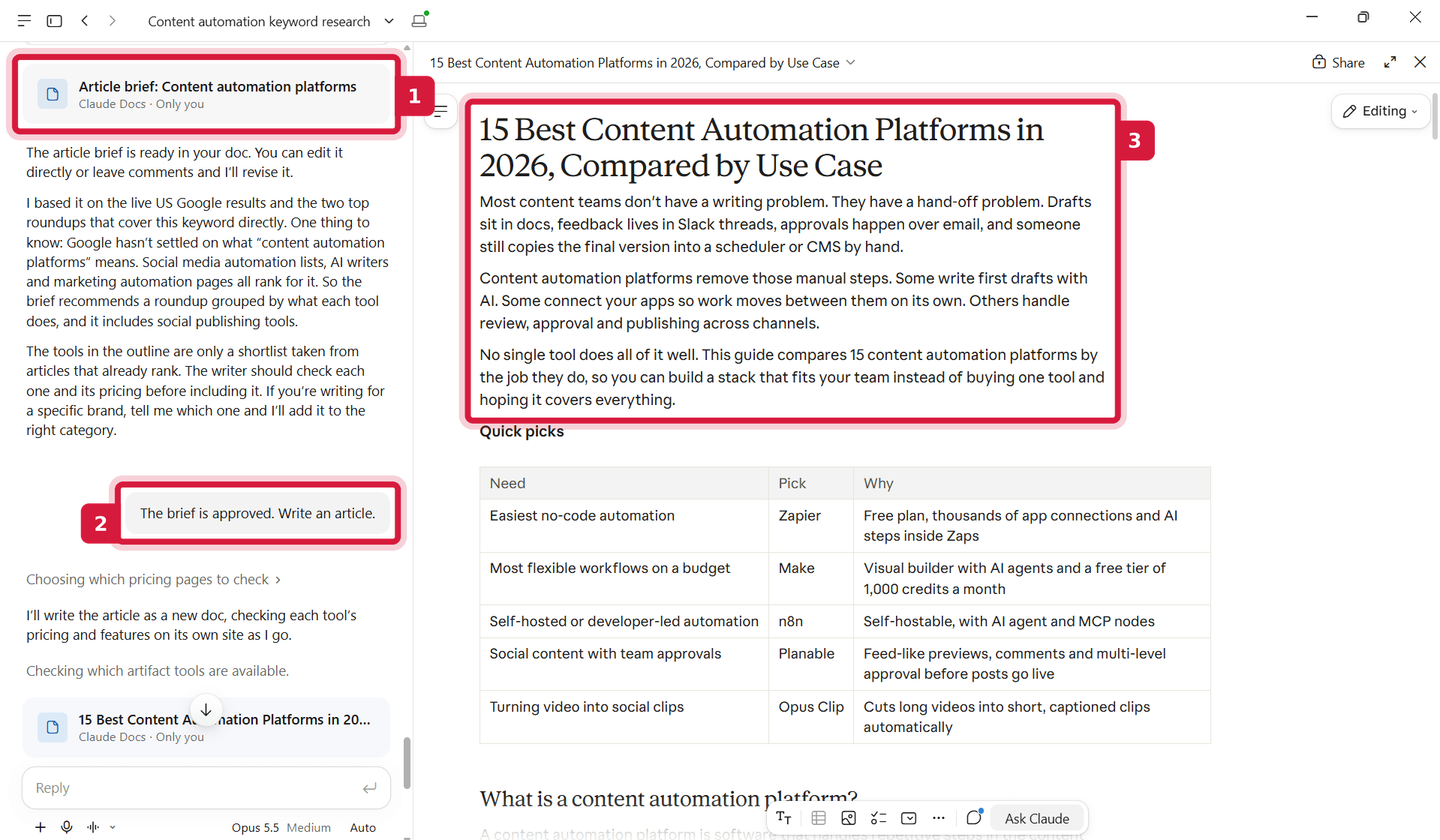
At SE Ranking, for instance, we use our own Claude plugin for drafting. It’s built from a series of skills and writing agents that produce a first draft ready for human editing. The skills hold the instructions the agents write against: the tone and voice we prefer, our rules for long-form content, quality checks, and the writing procedures we follow. The agents do the actual writing within those rules.
The principle behind it transfers regardless of your tools: the more of your standards you encode as explicit instructions, the more consistent the draft, and the less the editing stage has to repair.
Stage 4: Publishing
Once a draft clears review, publishing tools push it live.
If your CMS integrates with your automation stack, you can send approved content straight there and use scheduling tools to time the release. If you’re running the workflow through Claude alone, publishing directly to WordPress is still hard to automate, which is why most teams route that step through n8n or Make. Connectors like these wire the publish step into a single pipeline.
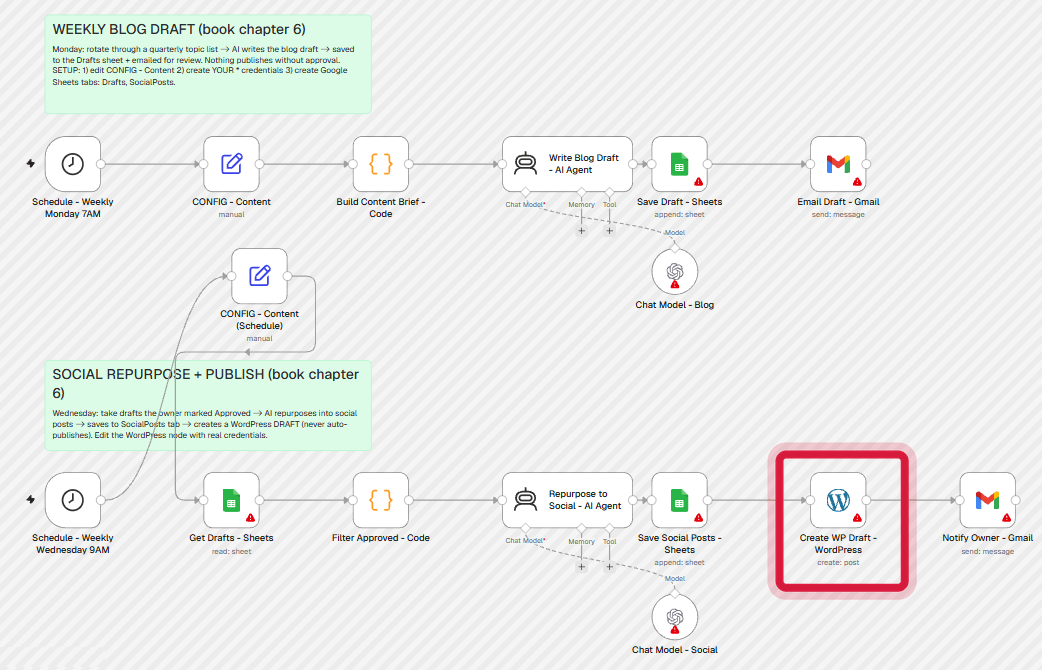
Stage 5: Performance tracking and iteration
Publishing isn’t the finish line. Once a piece is live, tracking starts.
You add its focus keyword to SE Ranking Rank Tracker for daily position data, check whether the page is getting picked up in AI search sources, and watch its traffic in via Google Analytics 4 integration.
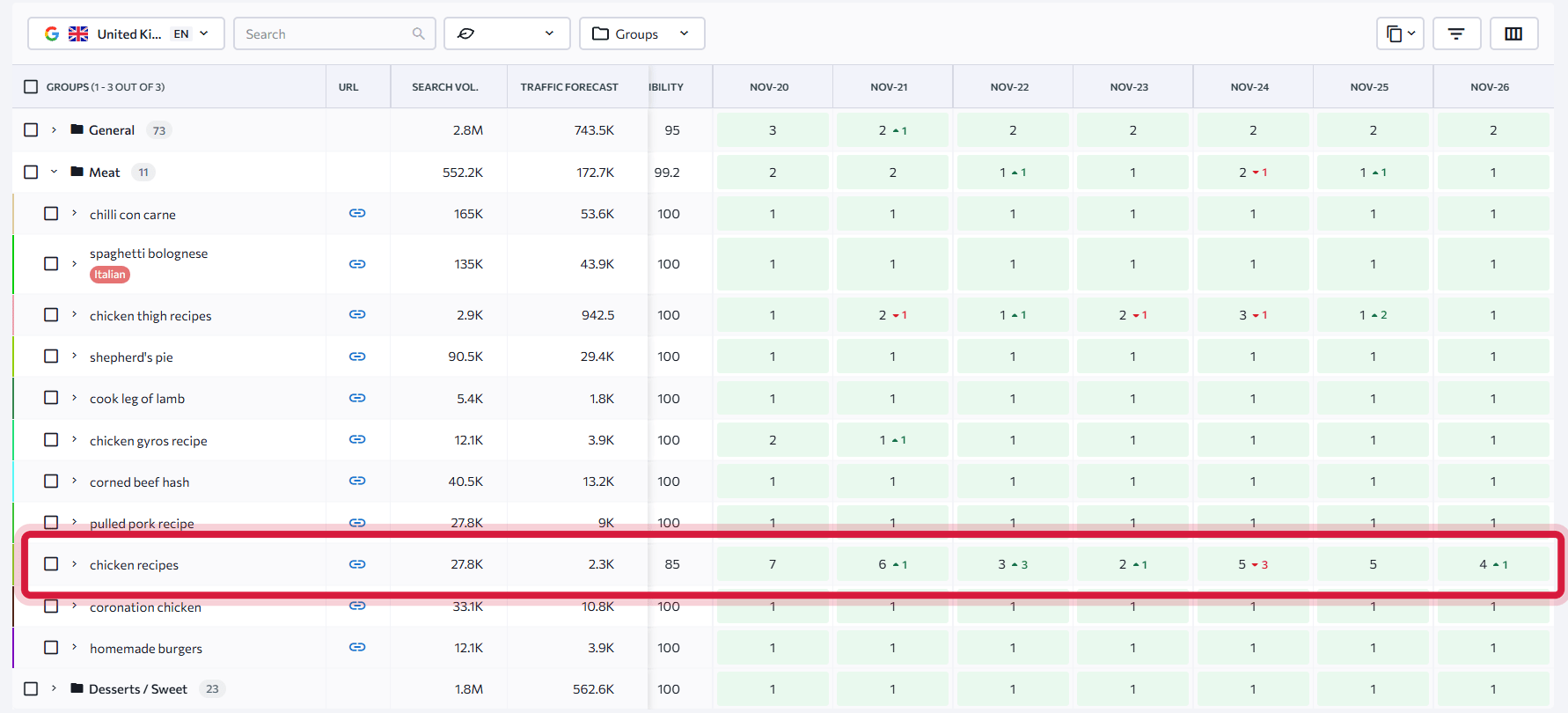
Most of that monitoring can run on its own. Connect SE Ranking, GSC, and GA4 to Claude via MCPs and you get all the tracking data in a single AI chat automatically. Notice some drops below a set threshold and fire a refresh task from there.
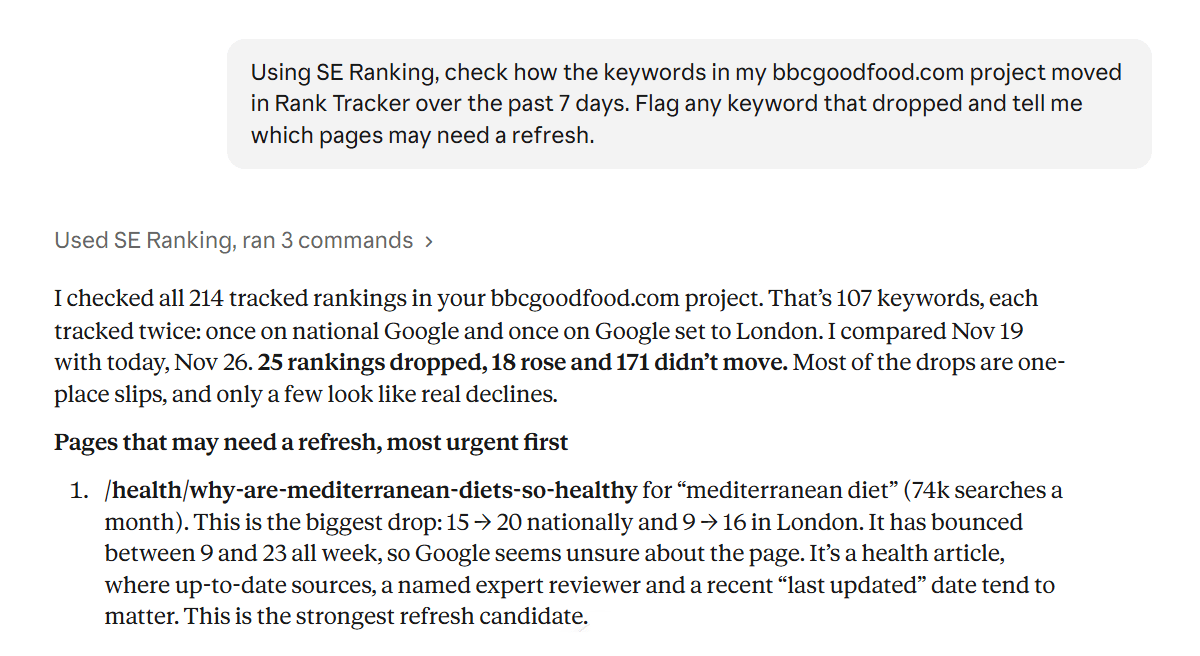
This loop is what separates content automation from one-way publishing: performance data becomes the input for the next steps.
Two SEO content workflows worth automating
Most SEO content work falls into two workflows:
- The first creates new pages.
- The second keeps existing ones competitive.
Teams tend to build automation for the first and handle the second manually, which is backwards, since the second is usually where the faster returns are.
Workflow 1: New content creation
This is the lifecycle covered above, running end to end: keyword research identifies the opportunity, a reviewed brief defines the structure, generation produces the draft, an editor signs off, and the piece publishes. Automation does the production work between the human gates.
It’s the workflow most teams automate first, because the stages are linear and the output is visible: more pages, shipped faster. The risk is treating volume as the goal. A creation pipeline with no judgment layer scales output and ranking problems at the same rate.
Workflow 2: Content updates and optimization
This workflow improves pages you’ve already published. It starts from a trigger rather than a blank page. Two kinds set it off:
- Performance signals: A tracked page slips in rankings, loses traffic, or stops showing up in AI search answers. The tracking layer catches the drop and flags the page for review.
- Product or industry changes: You ship a new feature, new approaches appear in the industry, a fact in the piece goes stale, or the search intent behind the query shifts. The content no longer matches reality, even if its rankings haven’t moved yet.
Once a page is flagged, the workflow can reuse most of the creation pipeline: re-run the SERP and keyword analysis to see what’s changed, update the brief against the current top results, revise or regenerate the affected sections, and republish. Still, the same human gates should apply. Someone still confirms the update is accurate and worth making before it goes live.
The reason this workflow suits automation so well is that the trigger can fire on its own. Connect your rank and traffic tracking to the content layer, and a page drop can open a content refresh task without anyone watching a dashboard.
The tools that run an SEO content automation workflow
A working setup has two layers: an orchestrator that runs the workflow and passes work between steps, and connectors that feed it live data.
The orchestration layer
This is what runs the steps in order and decides what happens on a trigger. There are two main approaches here:
- AI assistants like Claude. Faster to get going, especially if you’re running the workflow conversationally or through a custom plugin. The tradeoff is stability: automations built this way are easier to set up but more prone to breaking or drifting on a complex, multi-step run.
- Automation tools like n8n and Make. More setup up front, but also more stable in production. These workflow automation platforms are built for conditional logic, scheduled triggers, and pipelines that run unattended.
A common pattern is to use both: Claude for the reasoning-heavy steps like analysis and drafting, n8n or Make for the mechanical wiring that has to run on schedule.
The data layer
MCP lets an AI orchestrator pull live data from a source on demand, instead of working from exports or inventing things. Connectors are what supply the orchestrator with the signals each stage needs.
The most useful MCPs for SEO content automation include:
- SE Ranking to feed keyword, competitor, rank, and AI search data from SE Visible (AI visibility platform from the same team) into the workflow
- GSC and GA4 to supply query performance, traffic, and engagement data
- Notion to hold the brief, calendar, knowledge base, and drafts, so the orchestrator can read and write where your content lives
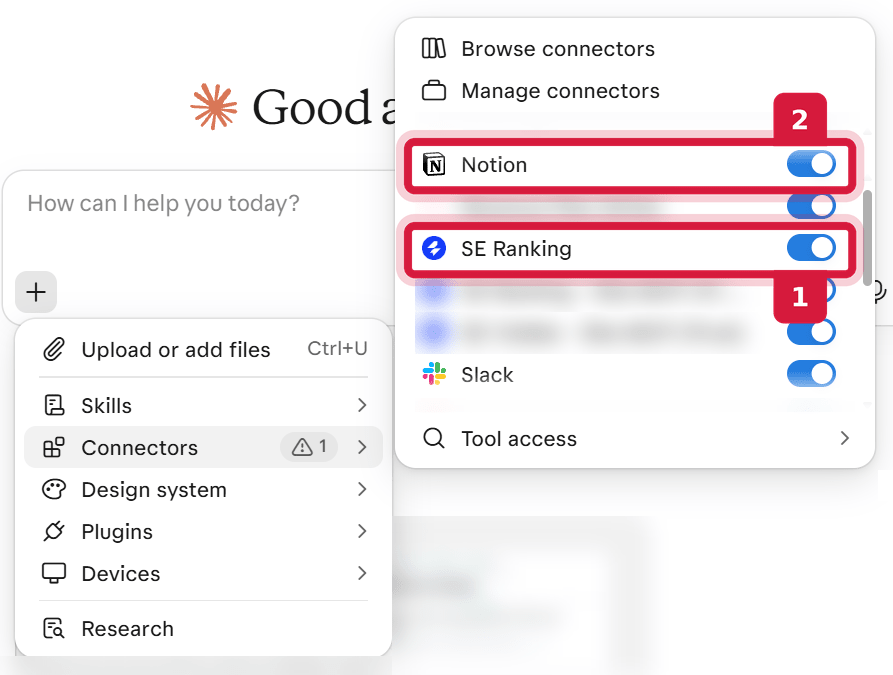
Others slot in the same way, depending on your stack. The point isn’t the specific list. It’s that the orchestrator stays current because the data comes in live, so a brief and then the content reflects the current input.
Where SEO content automation breaks down
According to McKinsey’s State of AI 2025, nearly one-third of organizations that use AI report consequences from AI inaccuracy. That number hasn’t stopped adoption, but it should shape how you build.
Hallucination and factual drift
The primary driver of factual errors in automated content is the absence of live, grounded data feeding into the generation process. When an AI agent drafts at scale using only training data and a generic brief, it fills gaps with plausible-sounding claims that may be months or years out of date.
The fix starts with what you feed the model.

When you connect SE Ranking through MCP to your stack, your automation operates on real-time data: every prompt pulls current keyword and SERP snapshots at the moment of generation, rather than working from cached exports. That is the architectural fix.
Brand voice drift at scale
Volume is the enemy of consistency. At ten articles a month, a human editor catches tone variation. At a hundred, the gaps between brief, writer, and final copy compound across every piece, and the output starts reading like it came from three different organizations.
The fix is editorial templates with explicit constraints. Document your editorial standards:
- Approved vocabulary and banned phrases
- Tone examples that reflect your voice
- Sentence-length and structural guidance
Without those constraints, AI averages across everything it has trained on. Explicit vocabulary and tone inputs are what anchor output to your voice.
John Mueller, Google Search Advocate, put it plainly in November 2025: “I wouldn’t think about it as AI or not, but about the value that the site adds to the web. Just rewriting AI content by a human won’t change that, it won’t make it authentic.” Surface-level editing doesn’t fix shallow inputs.
Automation without a performance feedback loop
Most teams automate the production side and stop there. Content goes out; ranking and traffic data comes back; nobody connects the two systematically.
The result is that your automation scales whatever is producing weak results just as efficiently as whatever is working. A feedback loop means routing rank movement and traffic data back to your brief templates on a defined cadence: monthly at minimum, weekly if your publication volume justifies it. Without that cycle, you are optimizing for throughput rather than outcomes.
How to implement content automation for SEO
Implementation sequencing matters. Teams that automate distribution before they automate topic discovery tend to build volume without direction, shipping content that fills a calendar but misses actual search demand.
Step 1: Audit your current content workflow
Map every stage of your current process and flag two things: where the highest manual overhead sits, and where the work involves the least strategic judgment. Stages with high manual overhead and low strategic variability are your automation candidates:
- Formatting briefs to a standard template
- Pulling keyword data for a batch of topics
- Scheduling approved content for publication
Stages that require editorial judgment stay with your team.
While you’re mapping, check what’s actually driving the workflow. Keyword and SERP data should be the input that decides what gets made, not a step you bolt on later. If your process starts from anything other than demand, fix that before you automate it, otherwise you’ll just produce the wrong things faster.
Step 2: Build and test one pipeline before scaling
Pick one workflow segment and automate it end to end before touching anything else. Teams that automate everything at once typically end up with several half-working pipelines and no clear owner for any of them.
For most teams, n8n or Make offer a low-code path to wiring your research and publishing tools into a single pipeline without custom development. If you have engineering capacity, the SE Ranking API gives you programmatic access to keyword and rank data for custom pipelines. MCP connections go further, letting AI agents query live SEO and GEO data on demand inside the workflow.
Test on a small content set, ten to twenty pieces, before scaling the same pipeline across your full program. At that size, errors are recoverable. At a hundred pieces, the same misconfigured brief template or missing review gate produces problems you’ll spend weeks unwinding.
Step 3: Define editorial standards before you scale output
The point at which automation starts producing volume is exactly when the absence of editorial standards becomes visible. Document three things before scaling:
- A style guide covering voice standards and off-limits vocabulary
- An approval workflow specifying who reviews before anything goes live
- A fact-check gate for AI-generated claims, particularly statistics and product details
Without these in place, automated content drifts in both quality and consistency faster than manual content does. That is not a problem you can fix retroactively across hundreds of pieces.
Step 4: Close the feedback loop with performance data
Without a feedback loop, automation is a content factory. Connecting rank performance back to your content workflow is what turns it into a system that improves over time. We’ve talked about this a lot in this guide. Let it be another small reminder.
FAQ
What is content automation?
Content automation is the process of running the repeatable steps in content production through specialized tools, from planning through publishing. Automated output still needs human review for accuracy and brand consistency before anything goes live.
What are the four types of automation?
In content workflow terms, the four types are:
- Fixed automation: repeatable tasks with no variation, such as scheduled social publishing
- Programmable automation: rule-based sequences, such as trigger-based distribution after content goes live
- Flexible automation: systems that adapt to variable inputs, such as brief templates that adjust to keyword data
- Intelligent/AI automation: AI-driven content generation and optimization across the full lifecycle
What are the top 5 automation tools?
Organized by role in the workflow rather than by ranking:
- Orchestration: Claude, for running reasoning-heavy steps like analysis and drafting
- Pipeline automation: n8n or Make, for wiring steps into a pipeline that runs unattended
- SEO and GEO data: SE Ranking, connected live through its MCP connector
- Performance data: Google Search Console and GA4 for traffic and queries
- Content workspace: Notion, where briefs, calendar, and drafts live
Conclusion
Here’s the part that’s easy to miss: automation doesn’t give you a content strategy. It runs the one you already have, just faster and at more volume. If your process starts from search demand and runs through a real review gate, that’s what scales. If it starts from a calendar and skips the gate, that scales too.
Which is why the real work happens before you wire up a single tool.
So decide what you’re scaling before you scale it. Automation makes a good strategy easier to run, and a bad one a lot more expensive to keep.