Best SEO MCP servers in 2026: Which to connect, and why
Your AI assistant is already running SEO tasks, but it has no live data unless it is connected to one. MCP servers close that gap by connecting your AI assistant to live data sources.
This article covers six main MCPs built for SEO:
- SE Ranking
- Google Search Console
- GA4
- Firecrawl
- Screaming Frog
- BigQuery MCP
Each solves a different part of the workflow, and there is a dedicated section on running them together.
Quick overview of SEO MCP servers
Deployment
Remote
Starting price
$50 minimum deposit for pay-as-you-go or $129/mo for the Core plan
Best for
Teams needing ranking + keyword + backlink + AI visibility in one connection
Deployment
Local
Starting price
Free
Best for
Any SEO team cleared to connect GSC data to AI
Deployment
Local
Starting price
Free
Best for
Any SEO or marketing team prioritizing analytics and conversion data
Deployment
Remote
Starting price
Free tier available
Best for
Content tasks that need the real page content, pulled reliably and consistently
Deployment
Desktop app
Starting price
$279/yr (license)
Best for
Technical SEO practitioners
Deployment
Remote (Google-hosted)
Starting price
Free / 1 TB and above; $6.25 / 1 TB, per 1 month
Best for
Querying Google Data and bulk exports at scale
Remote
$50 minimum deposit for pay-as-you-go or $129/mo for the Core plan
Teams needing ranking + keyword + backlink + AI visibility in one connection
Local
Free
Any SEO team cleared to connect GSC data to AI
Local
Free
Any SEO or marketing team prioritizing analytics and conversion data
Remote
Free tier available
Content tasks that need the real page content, pulled reliably and consistently
Desktop app
$279/yr (license)
Technical SEO practitioners
Remote (Google-hosted)
Free / 1 TB and above; $6.25 / 1 TB, per 1 month
Querying Google Data and bulk exports at scale
SE Ranking MCP
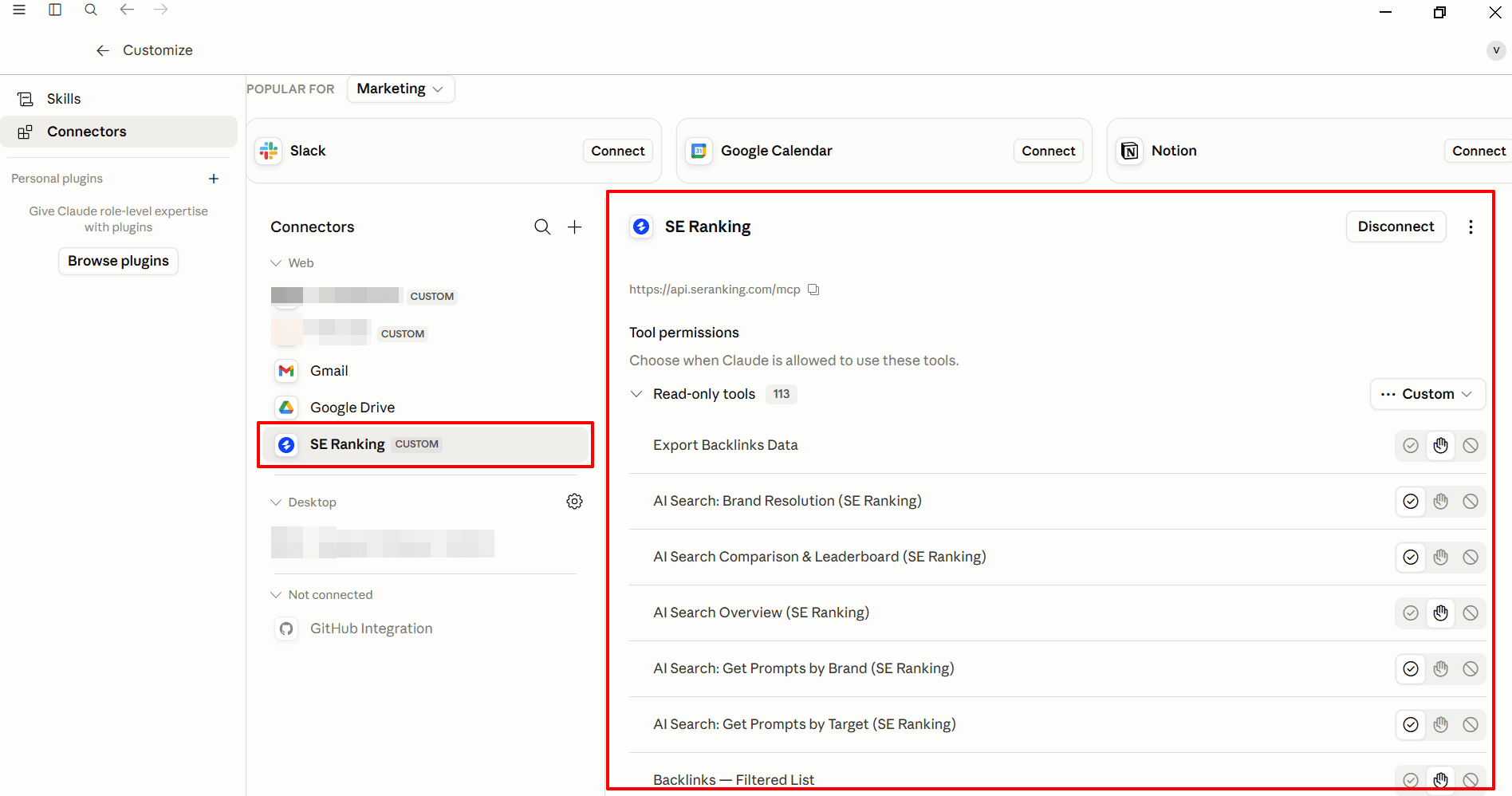
SE Ranking MCP connects your AI assistant to the full SE Ranking data stack: keyword research, backlinks, rank tracking, site audits, and AI search visibility. It’s one of the few SEO MCPs that combines all of this in one connection, making it a strong fit for teams managing both traditional and AI search presence.
The SE Ranking MCP documentation lists 180+ tools, all of which run on a hosted remote server built on the SE Ranking API. It works with:
- Claude (Desktop, Code, Web)
- ChatGPT (including as ChatGPT app) and Codex
- Cursor
- VS Code
- Windsurf
- Zed
- Gemini CLI
What SE Ranking MCP covers
SE Ranking MCP covers the platform’s full data stack:
- Keyword research: You can extract search volume, CPC, competition, difficulty, and historical trends from a 5.4 billion-keyword database across 188 countries, plus similar, related, question, PAA, and long-tail keyword discovery from a seed term.
- Competitive research and gap analysis: Get domain overviews by region or worldwide, competitor keyword overlap and gaps, top pages, traffic estimates, paid-ad data.
- Backlink audits: Query access to 2.2 billion domain profiles with backlink and referring-domain counts, anchors, indexed pages, new/lost/cumulative change tracking, and page/domain authority.
- Position tracking across search and AI: Daily and weekly position changes for a keyword set across desktop, mobile, and specific locations, with competitor positions and shifts in SERP features like AI Overviews at the project level.
- Technical site audits: Run standard or JavaScript-rendered crawls returning health scores, categorized issues, page-level metrics, and the exact URLs affected by each issue, which Claude can filter into engineering-ticket descriptions
- AI search visibility tracking: Get citation and presence data across ChatGPT, Gemini, Perplexity, AI Overviews, and AI Mode, drawn from 25.5M+ tracked prompts, with a share-of-voice leaderboard comparing a domain against up to 10 competitors.
The last point particularly useful. You ask Claude which AI Overviews cite your brand for a target topic, pull the citation gap against a competitor, and get a prioritized list of content improvements. The output gives you specific gap items rather than a generic directive to optimize for AI Overviews.
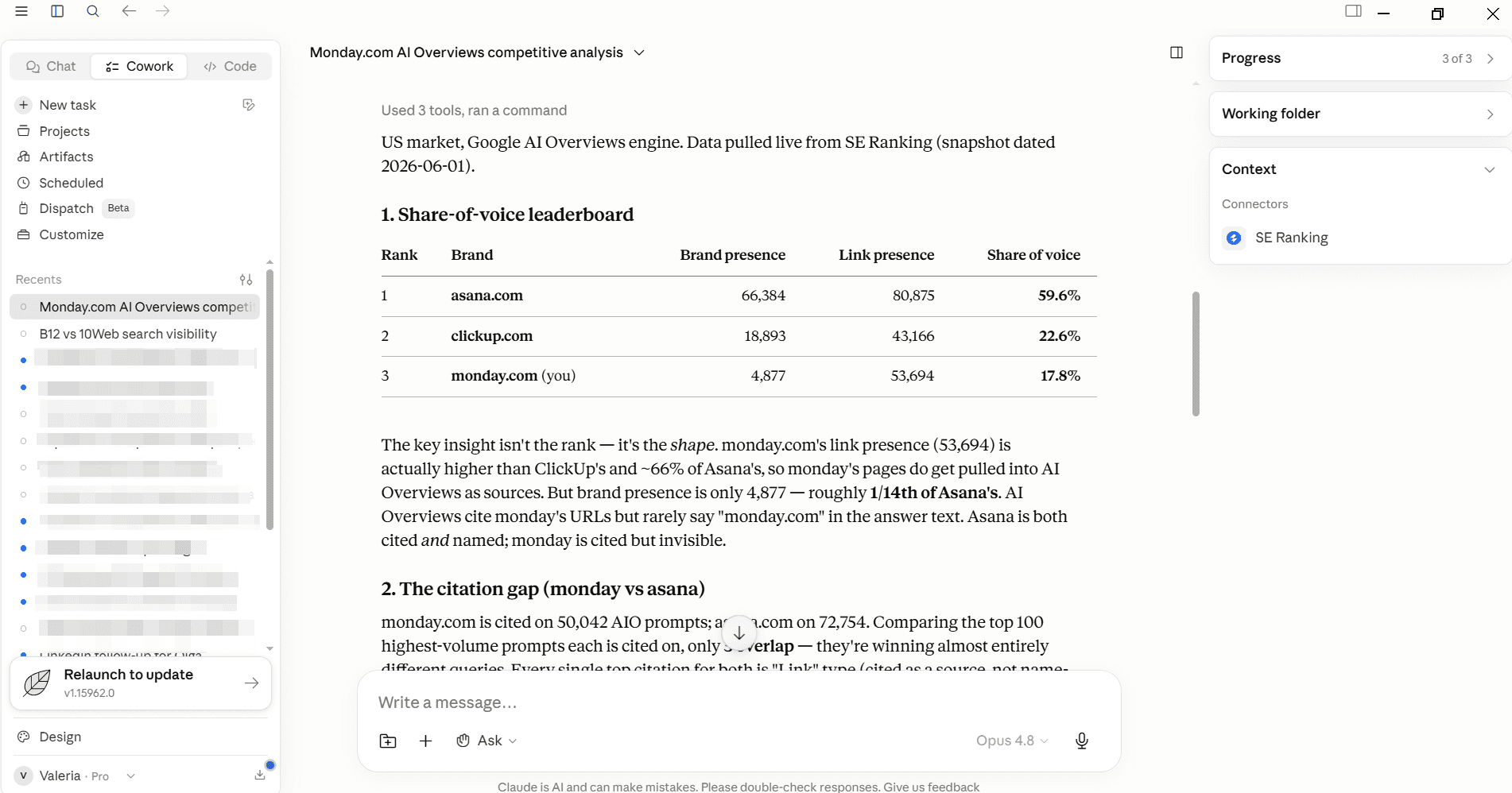
SE Ranking also maintains over 20 open-source Claude skills that sit on top of the MCP connection. Each one gives Claude a defined workflow for a specific SEO or GEO task. The set covers content brief creation, AI search visibility analysis, backlink gap analysis, ads intelligence, and more.
Because the skills are open source, you can inspect, modify, or extend them. For teams setting up SE Ranking MCP for the first time, the skills reduce the prompt-engineering overhead for common SEO workflows.
Pricing and setup
MCP access is included with Core and Growth plans. There is no separate MCP add-on fee.
Price
$129/mo ($103.20/mo annual)
MCP access
Included
Price
$279/mo ($223.20/mo annual)
MCP access
Included
Price
From $179/mo annual
MCP access
Included
Price
$50 min / 250K credits
MCP access
Included
Price
$45/mo for 3M credits (annual)
MCP access
Included
$129/mo ($103.20/mo annual)
Included
$279/mo ($223.20/mo annual)
Included
From $179/mo annual
Included
$50 min / 250K credits
Included
$45/mo for 3M credits (annual)
Included
A 14-day free trial includes full endpoint access and 100K Data API credits, which is enough to run meaningful keyword research, backlink, and AI prompts before committing to a plan. MCP access is included.
The setup depends of the platform you want to connect SE Ranking’s MCP to. For example with Claude, you can simply go to the Customize section and choose Connectors. Then add custom connection, name it SE Ranking , and then add a link to the MCP: https://api.seranking.com/mcp
Typical use cases:
- Schedule traditional ranking and AI visibility reports in Claude
- Run keyword research and cluster terms into topics for a content plan
- Build writer-ready content briefs from keyword and SERP data
- Audit backlinks and run competitive gap analysis
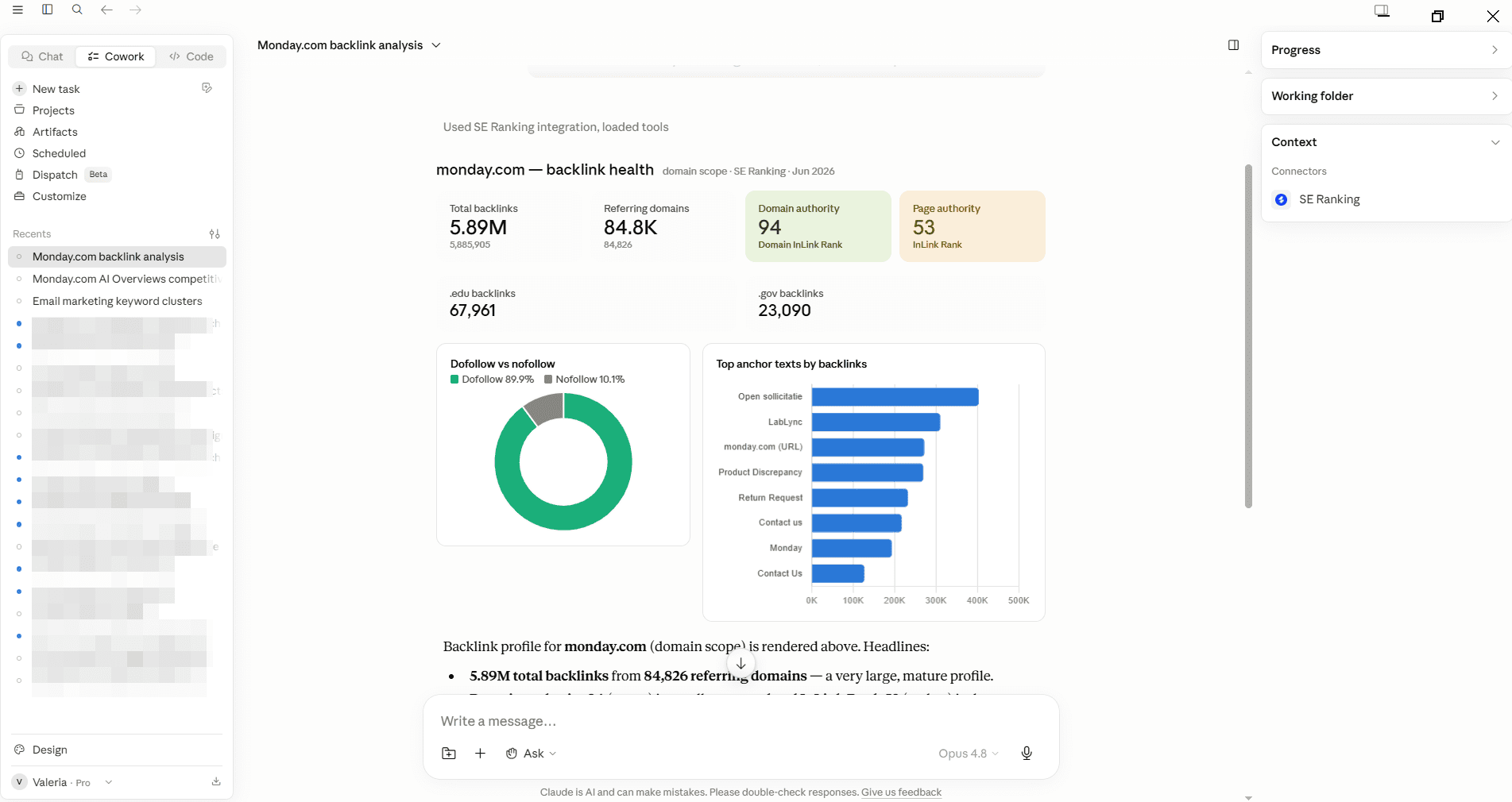
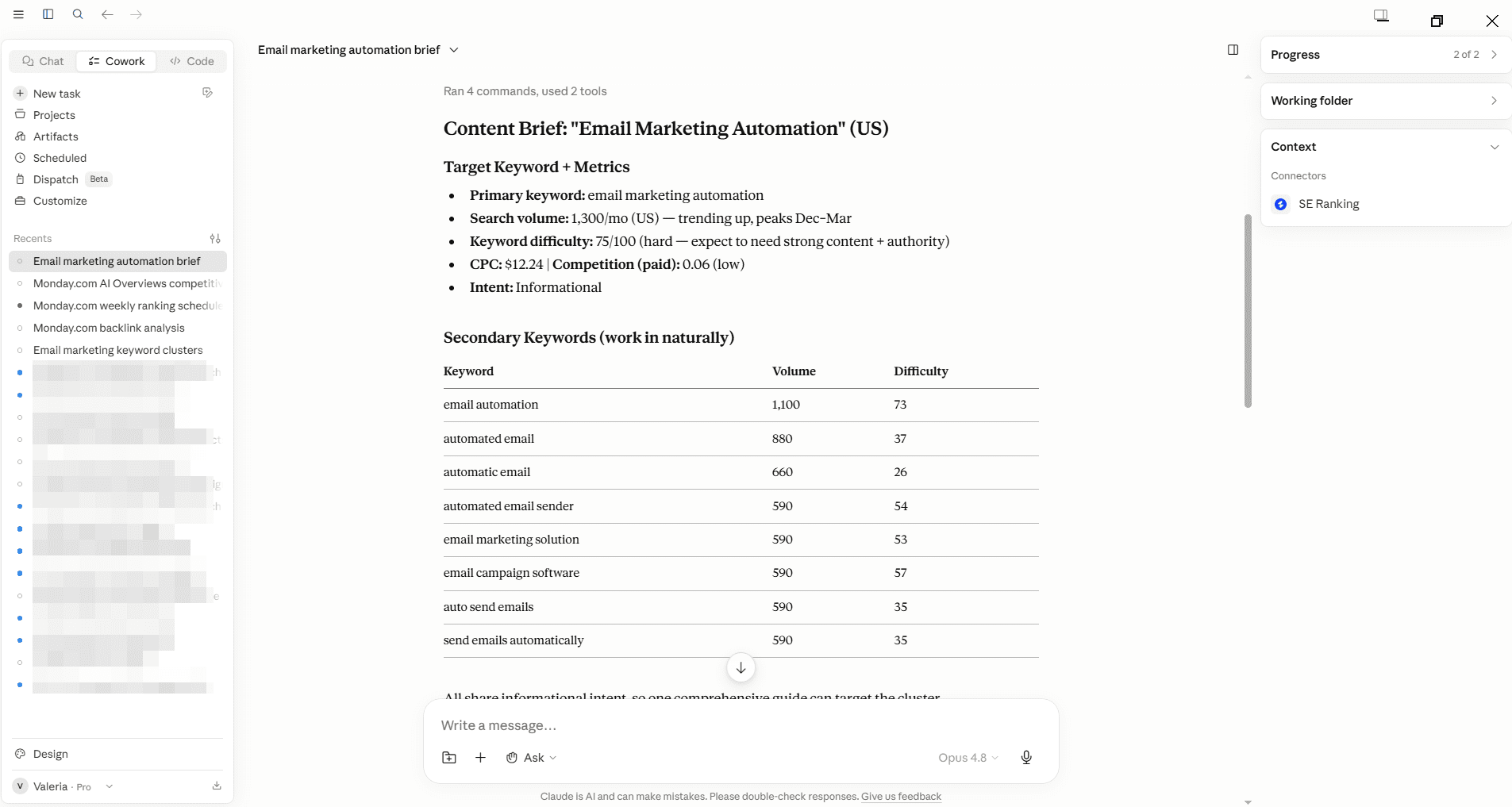
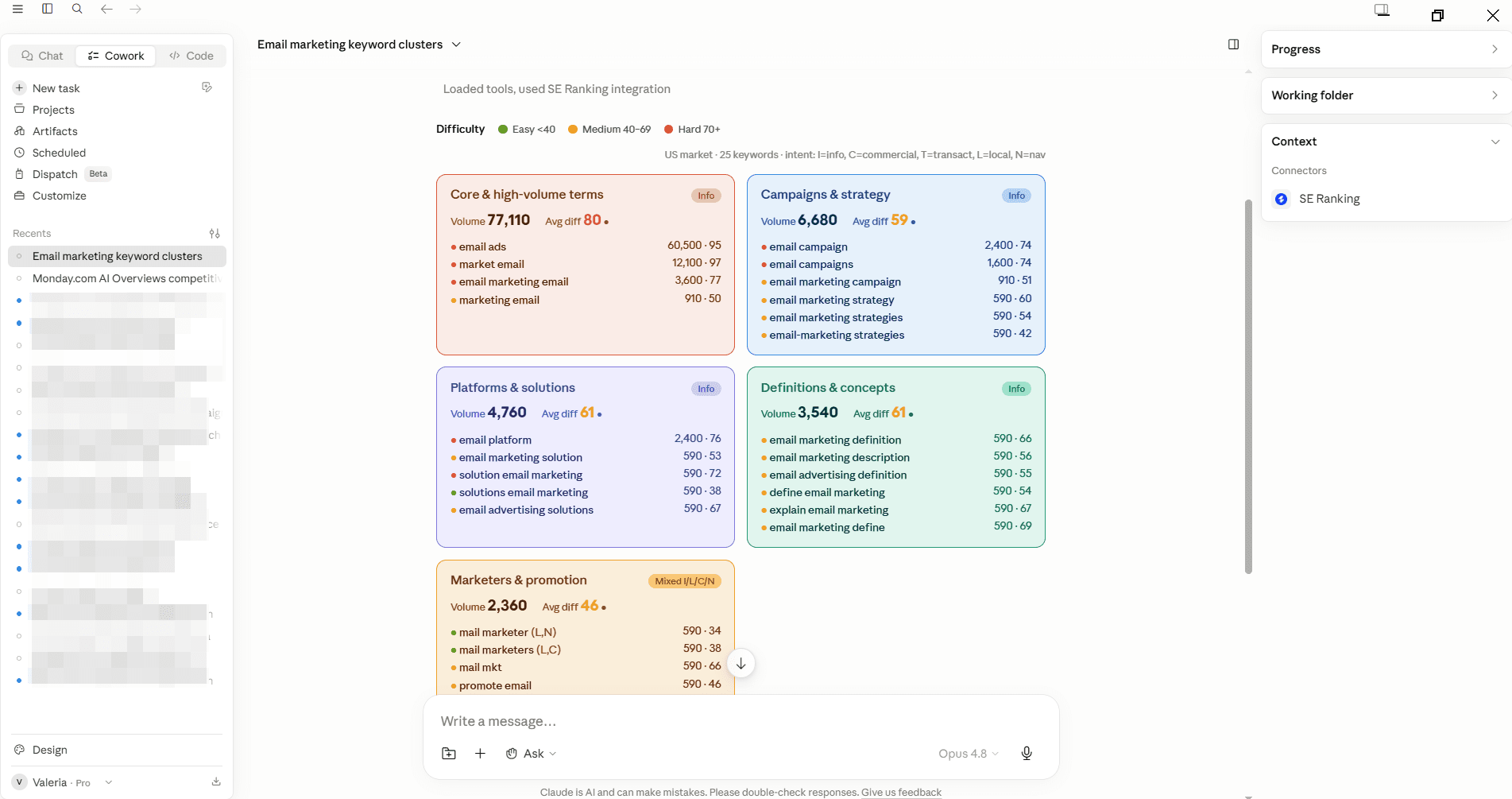
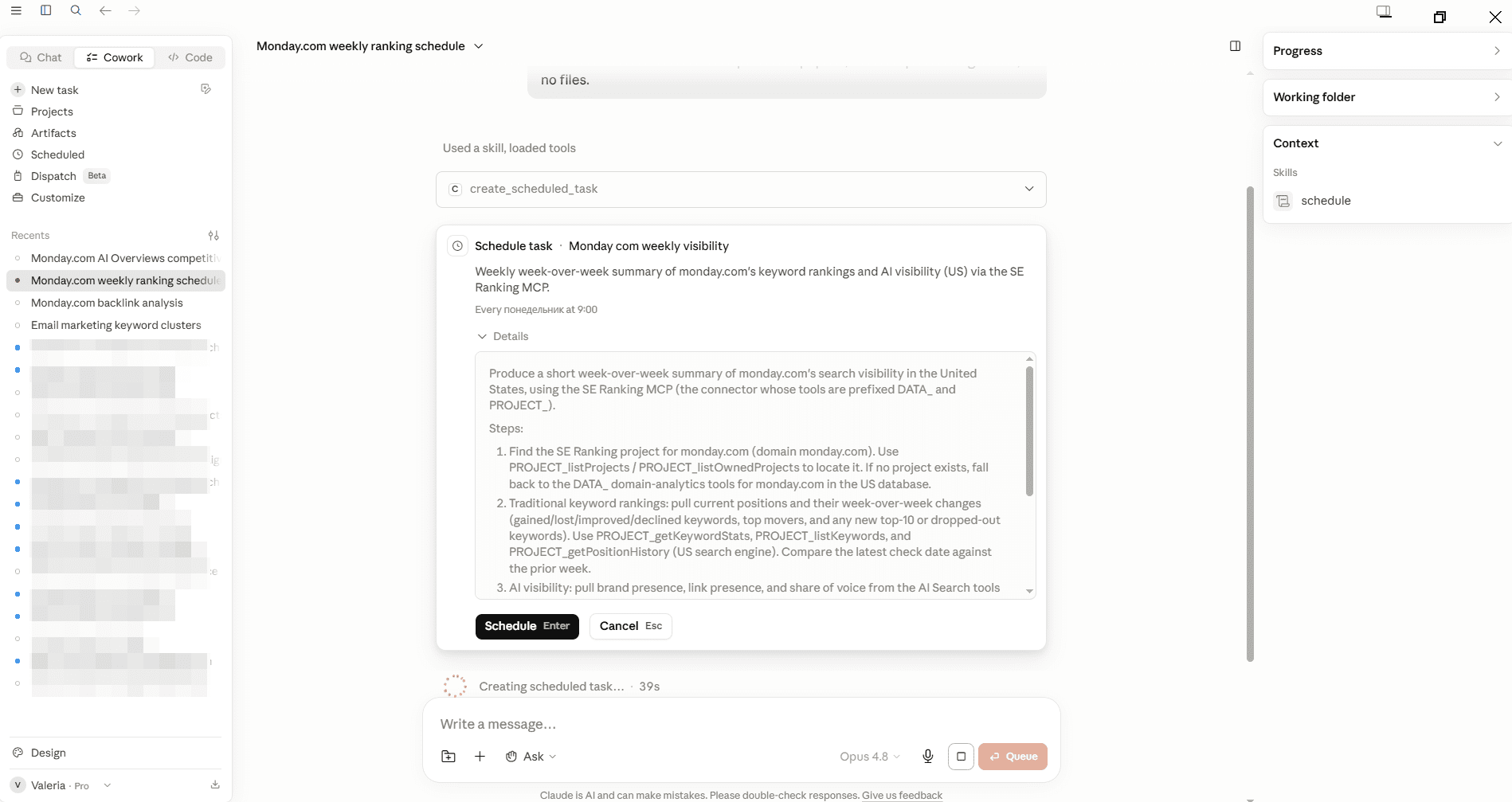
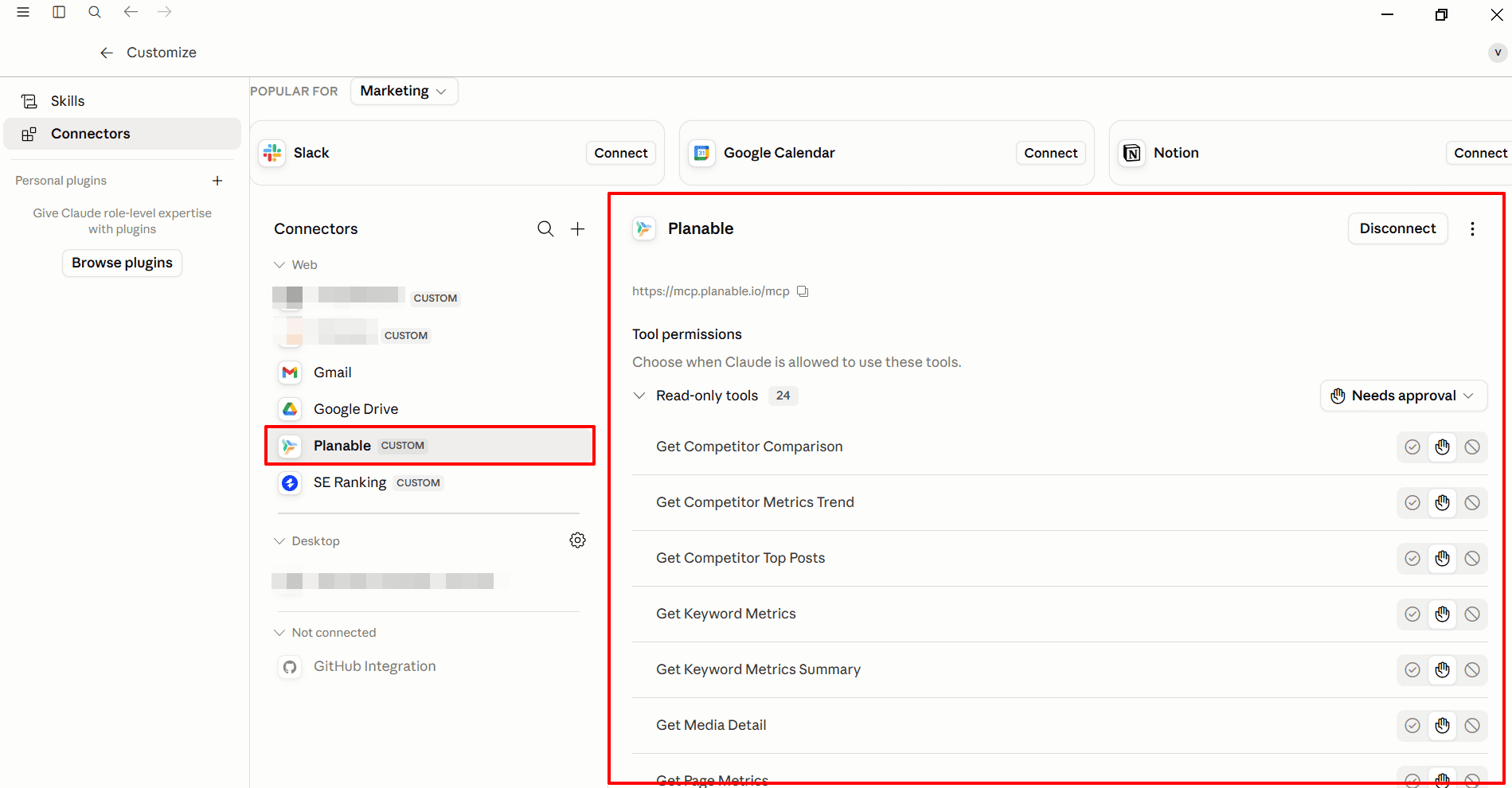
Planable, SE Ranking’s sister product, also has MCP and this means you can combine SEO and social workflows in one conversation. For example, with SE Ranking MCP you get the search and AI intelligence and then with Planable MCP you can turn it into social content, approve, and publish it. This is just one example of the use case and there are a lot more.
Google Search Console MCP
There’s no official Google-built GSC MCP, but the SEO community has built two that are in wide use. Both connect your AI assistant to your Google Search Console data through the same underlying Search Console API, so you can run diagnostics from a prompt instead of exporting and reformatting CSVs.
The two options:
Both are community-maintained, and neither is an official Google product.
What GSC MCP covers
A GSC MCP exposes your Search Console performance data: clicks, impressions, CTR, and average position, broken down by query, page, country, device, and date range. With that data in the conversation, you can have several practical workflows:
- Analysis and reporting: Pull the numbers and have your AI assistant summarize trends, traffic drops, and gains, without building filters in the GSC interface.
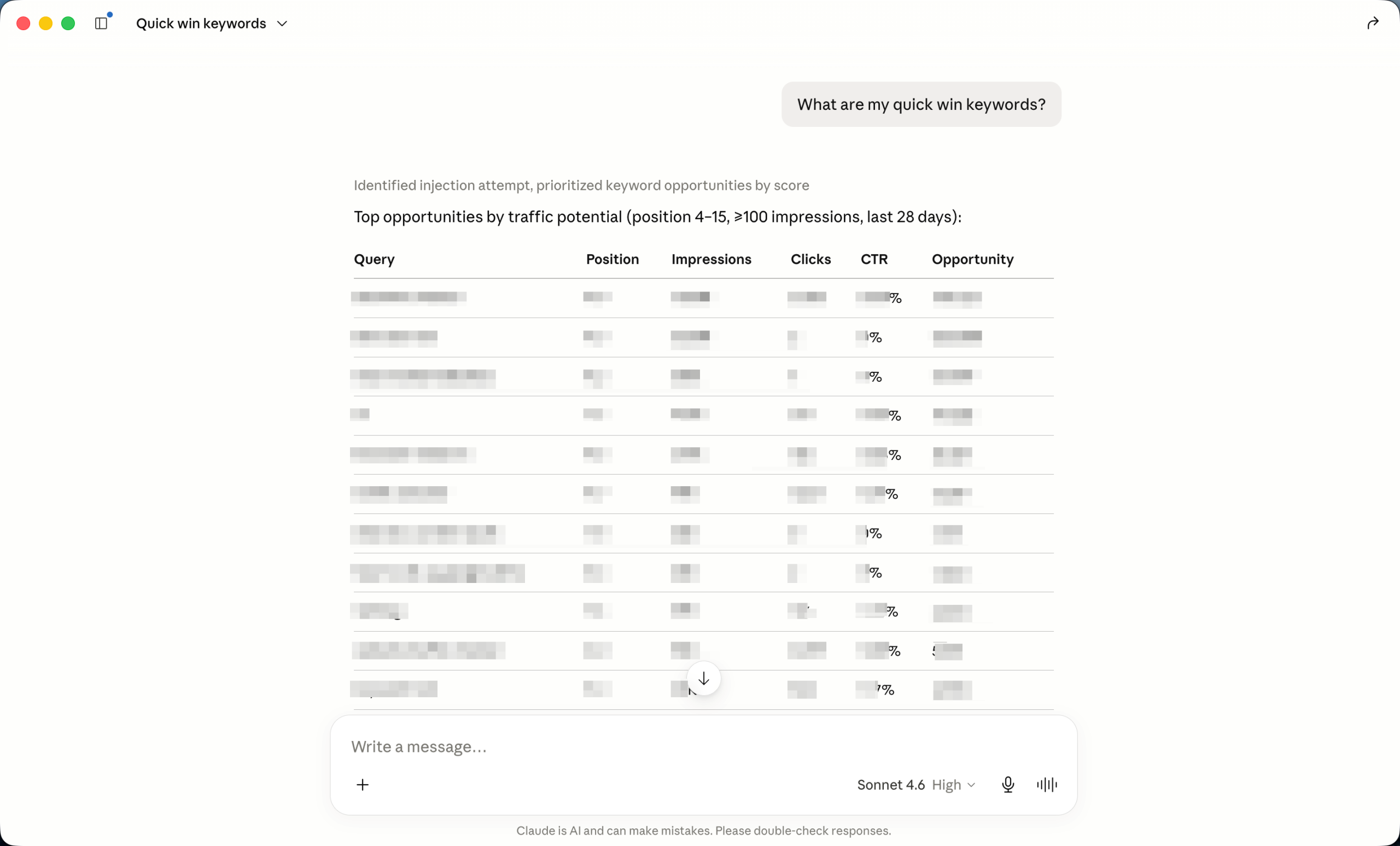
- Content audits: Surface decaying pages, keyword cannibalization across URLs, and pages with strong impressions but low clicks that are worth a title or meta rewrite.
- Internal linking: Find queries and pages where you have impressions but thin coverage, and map internal links to strengthen them.
Pricing and setup
Both versions are free and open source.
Standard setup connects through a Google Cloud service account with the Search Console API enabled. If you’ve turned on GSC’s bulk data export to BigQuery, you can also query that dataset through a BigQuery MCP, which suits larger sites or longer history.
Typical use cases:
- Summarize search performance and build reporting without manual CSV exports
- Audit content for decay, cannibalization, and quick-win pages
- Surface internal linking opportunities from impression and query data
Google Analytics 4 MCP
Google’s GA4 MCP lets you query Analytics data directly from Claude or ChatGPT using plain language, including traffic trends, channel breakdowns, and landing page performance. It is an official Google release, documented at developers.google.com/analytics/devguides/MCP, which puts it in a different category from the community-built tools on this list.
What GA4 MCP covers
Where a GSC MCP tells you how pages perform in search, GA4 MCP adds the layer underneath: what happens after the click. You get the behavioral and outcome data GSC doesn’t carry, including engagement metrics (engaged sessions, average engagement time, events) and conversions, so you can see not just which pages get traffic but which ones actually hold attention and convert.
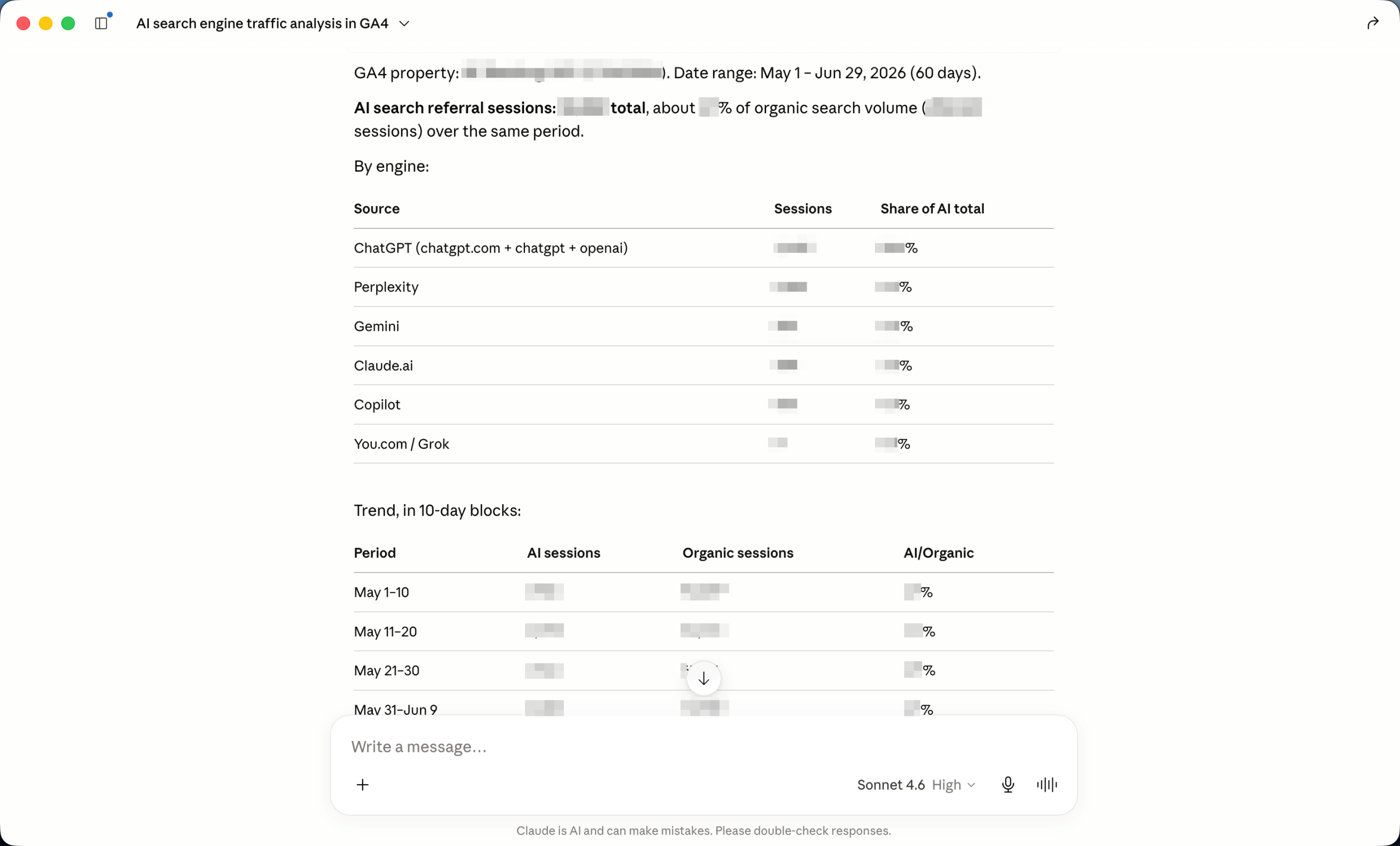
GA4 also shows where traffic comes from, including sessions arriving from AI engines like ChatGPT and Perplexity. That referral view is something GSC doesn’t provide, and it’s useful for understanding how much traffic your AI search presence is actually driving.
Run GA4 and a GSC MCP together and you get a full organic picture without switching tabs. You can ask your AI assistant to pull organic session trends by landing page for the past 90 days, isolate SEO-driven traffic by channel, and flag pages where organic clicks are rising but conversions are flat, each of which would otherwise mean navigating several GA4 reports by hand.
Pricing and setup
Pricing is free.
You can connect it in Claude Desktop alongside your other MCP connections. Setup follows the same pattern as other local MCPs: authenticate against your GA4 property and configure the server in your AI client’s settings. No additional licensing or account tier is required beyond standard GA4 access.
Typical use cases:
- Track organic session and engagement trends by landing page over time
- See traffic by channel and check what share organic visits have, and tie it to conversions
- Measure how much traffic your AI search presence sends from engines like ChatGPT and Perplexity
BigQuery MCP
BigQuery MCP is Google’s official connector for querying your BigQuery datasets from Claude. For SEO, the entry point is Google’s own data: once you’ve connected GA4 or GSC’s bulk data export to BigQuery, you can query months or years of performance data without sampling or row limits. It closes the gap the standard GA4 and GSC interfaces leave open when your site is large enough that aggregated data stops being useful.
What BigQuery MCP covers
The connector gives you six tools split into two groups. The read-only set covers exploring your data structure (listing datasets and tables, inspecting schemas) and running SQL queries in a safe read-only mode. The single write tool runs SQL with full read-write access — useful when you want to create derived tables or save query results — and requires explicit approval in Claude before it executes.
Query results are capped at 3,000 rows and queries time out after three minutes. For most SEO analysis tasks, that’s enough.
Pricing and setup
BigQuery MCP is a native connector in Claude. Go to Settings → Connectors → Google Cloud BigQuery and sign in with your Google account.
On the BigQuery side, standard query pricing applies: $6.25 per TiB scanned on-demand, with 1 TiB free each month. Most SEO data pulls against a GA4 or GSC export stay well within the free tier.
Typical use cases
- Query unsampled GA4 traffic data beyond GA4’s exploration report retention limits (14-month maximum on the free tier, 2-month default)
- Pull GSC bulk export data to analyze ranking trends across tens of thousands of keywords without API row limits
- Run custom SQL to segment pages by traffic delta, calculate crawl-to-click ratios, or identify content decay patterns
- Run ARIMA_PLUS forecasting on historical traffic data to project future performance by page or channel
Firecrawl MCP
Firecrawl MCP is a content research and extraction tool. It scrapes any website, including JavaScript-rendered pages, and returns clean, LLM-ready markdown your AI assistant can use directly.
What Firecrawl MCP covers
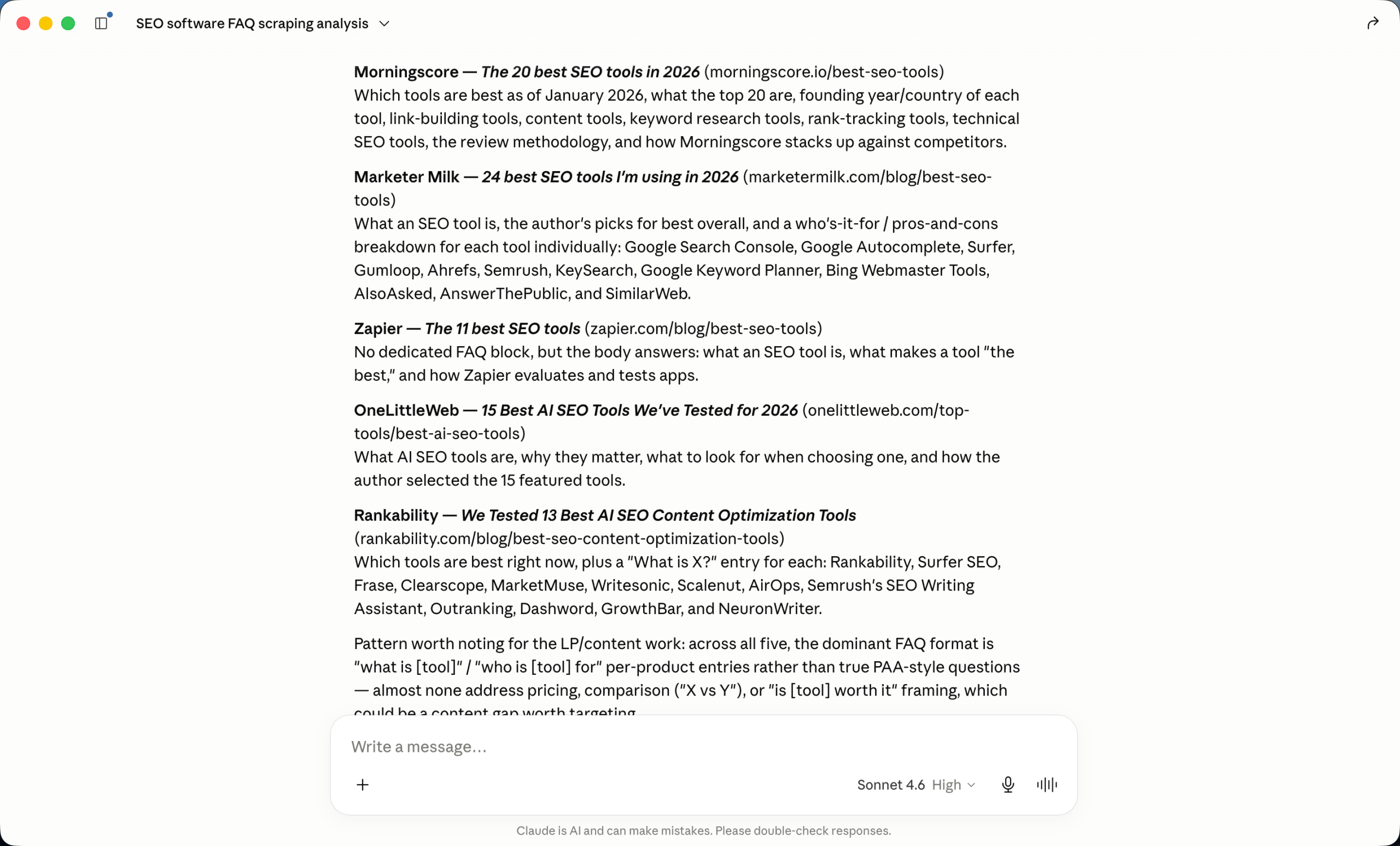
The reason Firecrawl matters for SEO is reliability of input. For any content audit or analysis task, you need your AI assistant working from the actual content on a page, not a guess. Point Claude at a URL without it, and you risk either invented content or a blank shell on JavaScript-heavy pages that don’t render their text in raw HTML.
Firecrawl closes that gap. It handles anti-bot mechanisms and client-side rendering, then returns the rendered page text as formatted markdown that goes straight into the model as context, with no copy-paste cleanup. The output is structured for an AI model to read, so the content you analyze is the content that’s actually live on the page.
For SEO work, the practical use cases fall into three categories:
- Scrape a competitor’s top-ranking page before writing a content brief, so your AI assistant has the actual text to analyze rather than a cached snippet
- Batch-crawl sections of a site to compare content structure across pages at scale
Pricing and setup
Pricing is credit-based, where one credit equals one scraped page or one PDF page:
- Free: 1000 credits/month
- Hobby: $19/month for 5,000 credits
- Standard: $99/month for 100,000 credits
- Growth: $399/month for 500,000 credits
The official server is at www.firecrawl.dev/mcp. Firecrawl runs as a remote, cloud-hosted MCP. No local install or Docker setup is needed. You connect it from your AI assistant’s MCP configuration and authenticate via API key from your Firecrawl account.
Typical use cases:
- Content audits grounded in a page’s actual live content
- Content briefs built from a competitor’s real top-ranking copy
- Content optimization, working from the current page text rather than a cached or guessed version
Screaming Frog MCP
Screaming Frog added native MCP support in version 24.0, released May 19, 2026. It is available in Settings > MCP Server to any licensed user at no extra cost.
What Screaming Frog MCP covers
The architecture here is different from every other MCP on this list.
SE Ranking, GSC, GA4, and Firecrawl are all API-based: they pull data from a remote service and return it to your AI assistant.
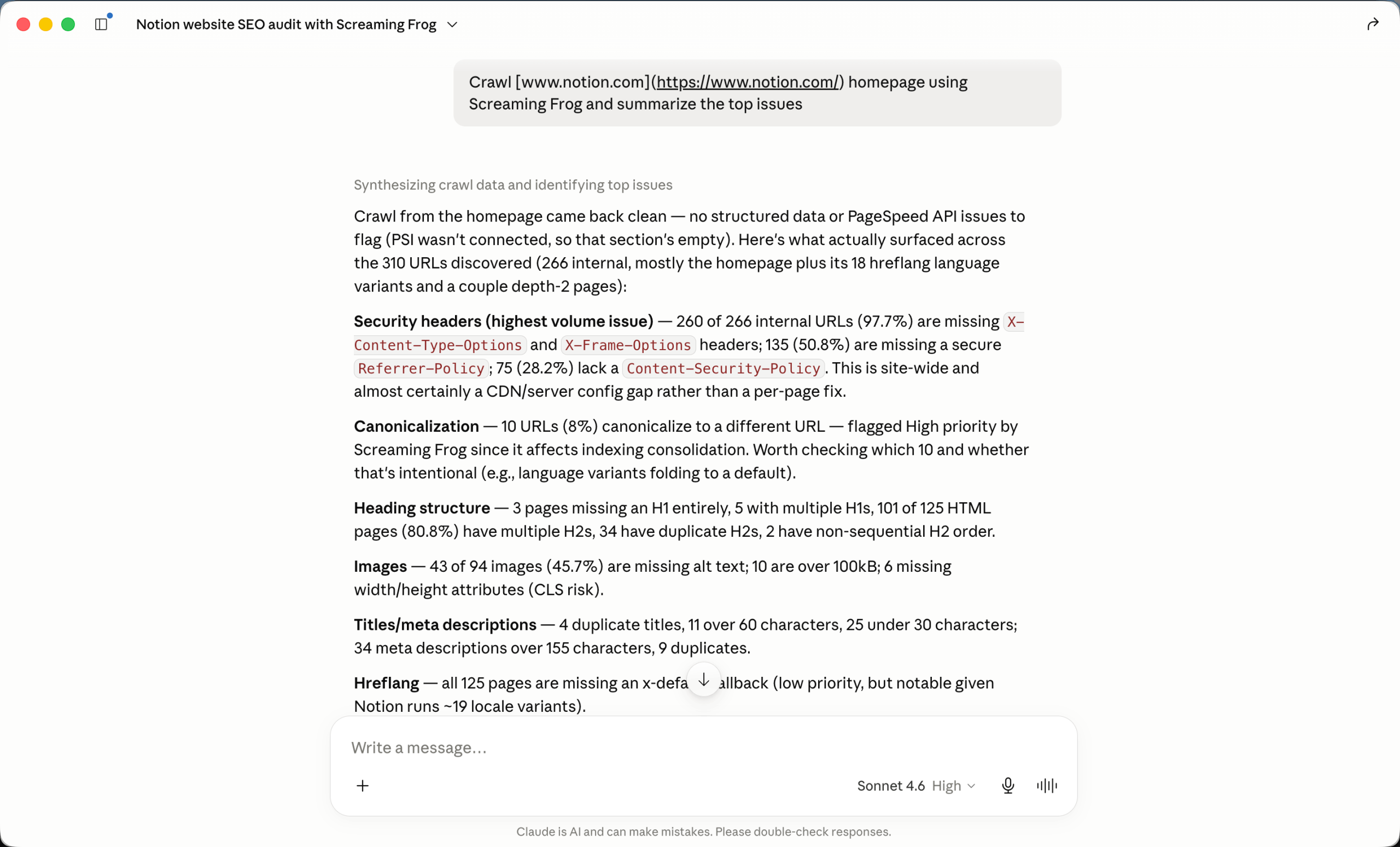
Screaming Frog MCP (approximately 29 tools) controls a live desktop crawler running on your machine. You can start a crawl, pause it, check progress, and pull reports from a prompt, without switching windows. If you already run Screaming Frog as part of your technical audit workflow, this is a meaningful change to how you interact with it.
The shift for a technical SEO is in that first item. Running a crawl used to mean switching to the desktop app, configuring it, waiting, then exporting a CSV. With the MCP, you issue a prompt, watch progress in the same thread where you’re analyzing the data, and pull the report when it finishes. On a migration audit or CMS QA check where you’re running targeted crawls, removing that context switch is the whole point.
Pricing and setup
Screaming Frog MCP is included with a standard Screaming Frog SEO Spider license, priced at $279/year. There is no separate MCP add-on or additional fee.
To set it up, open the Screaming Frog desktop app and go to Settings > MCP Server. You can also download the extension and add it to Claude desktop Settings > Extensions.
The MCP server runs locally alongside the application, which means it requires a live Screaming Frog instance on the same machine as the AI assistant client you are connecting to.
Typical use cases:
- Control a site crawl from a prompt and monitor it without leaving the conversation
- Pull structured crawl reports for analysis or developer handoff
- Inspect individual URLs for technical issues during a migration or QA check
Using these MCPs together
Each of these five MCPs above covers a distinct part of the SEO workflow, and they compound in value when installed together. None of them overlaps in what it measures. Installing all five means your AI assistant can pull from any of them in a single session, without switching contexts.
What each MCP contributes in a combined workflow:
- Firecrawl scrapes a competitor’s top-ranking page for your target keyword and returns clean, structured content
- SE Ranking MCP pulls the keyword gaps and backlink profile for that competitor domain
- GSC MCP confirms which of those gaps your site has the most organic traction to gain from, and surfaces internal linking options
- Screaming Frog MCP crawls your equivalent pages and surfaces any technical blockers
Each tool contributes data the others lack. The combination is more useful than any single connection.
5 common SEO MCP use cases
Once connected, these MCPs cover most of the recurring work an SEO team runs, often by combining two or three in a single prompt. The most common workflows:
- Keyword research, clustering, and content planning. Use SE Ranking MCP to pull keyword metrics and competitor gaps, cluster the results into topics, and turn them into a content plan, all from one connection.
- Reporting. Combine rank tracking with AI search visibility data from SE Ranking, then layer in search traffic from GSC and behavioral and conversion data from GA4, for a reporting view that spans traditional and AI search in one place.
- Technical site audits with issue prioritization. Pull structured crawl data (SE Ranking’s audit, or Screaming Frog for live desktop crawls), then have your AI assistant group issues by impact and draft prioritized fixes or developer tickets.
- Content briefing for new and existing content. Build writer-ready briefs from keyword and search data with SE Ranking, and pull a competitor’s actual top-ranking page with Firecrawl, so the brief is grounded in real content. The same workflow supports updating and optimizing existing pages.
- Competitive and backlink research. Use SE Ranking for competitor keyword gaps, traffic estimates, and backlink profiles, and Firecrawl to scrape competitor pages for content-level comparison.
Each of these can run from a single connection or a combination, without exporting data or switching tools.
Frequently asked questions
What are SEO MCP servers?
SEO MCP servers are integrations that connect AI assistants (such as Claude or ChatGPT) to live SEO data sources via the Model Context Protocol. Instead of relying on static training data, your AI assistant queries real-time keyword, backlink, rank, and crawl data on demand. They are one category of AI-powered SEO tools that has matured significantly in 2025 and 2026.
Which MCP server is best for SEO?
There’s no single best one, because each covers a different part of the workflow. The strongest setup is to combine the main ones: SE Ranking for keyword, backlink, rank, and AI search visibility data, GSC for search performance, GA4 for traffic and conversions, and Firecrawl for content extraction.
How do I connect SE Ranking MCP to Claude?
Go to the Customize section in your Claude and select Connectors. Add a custom connection, name it SE Ranking , and then add a link to the MCP: https://api.seranking.com/mcp
What can you do with SE Ranking MCP?
SE Ranking MCP covers the full SEO workflow from a single connection. You can run:
- Keyword research and competitive gap analysis across 5.4 billion keywords
- Backlink audits and gap analysis
- Rank tracking
- Technical site audits
- Content briefs
- AI search visibility tracking via AI Results Tracker (AIRT) across ChatGPT, Gemini, Perplexity, Google AI Mode, and Google AI Overviews
Is SE Ranking MCP free?
MCP access is not sold separately. It is included with the Core plan at $129/month and the Growth plan at $279/month. SE Ranking offers a 14-day free trial with 100K API credits, which covers MCP usage. No credit card required to start.
What SEO tasks can I automate with MCP servers?
MCP servers let you run the following tasks directly from an AI assistant prompt, without switching tools:
- Keyword research and clustering
- Backlink analysis
- Rank tracking
- Technical site audits with issue prioritization
- SERP analysis for content briefing
- AI search visibility monitoring (brand citations in ChatGPT, Gemini, Perplexity, Google AI Overviews)
- Competitive research
- Automated seo reporting
- Content audit
- Content planning
Does SE Ranking MCP work with ChatGPT?
Yes. SE Ranking is available as a ChatGPT app, so you can query the same keyword, backlink, rank, and AI visibility data from inside ChatGPT.
Putting it together
SEO MCP servers have gone from something new to a practical layer of the workflow in the space of a year. The teams getting the most out of them don’t just pick one tool. They’re connecting a few and letting their AI assistant move between live keyword, search, traffic, and content data in a single session. This is the real change worth adopting now.