Getting API access
Introduction
SE Ranking offers two powerful APIs to integrate our data and platform management capabilities into your workflows and applications:
- Data API: Designed for pulling large volumes of raw SEO and marketing data (e.g., AI Search, keywords, backlinks, domain data). It uses a flexible, pay-as-you-go credit system.
- Project API: Designed for automating and managing your SEO projects (e.g., creating sites, managing keywords, running audits). Access is tied to your main subscription limits.
One key, both APIs. A single API key authenticates every endpoint across the Data API and the Project API. There is no separate “Data key” and “Project key”: you generate one key and use it everywhere. What you can call depends on your plan, not on the key. Data API requests draw on your credit balance, while Project API requests use your subscription limits.
This guide explains the requirements and steps to gain access to both.
Data API
The Data API provides direct access to SE Ranking’s extensive databases. Usage is billed in API credits, and every current subscription plan includes a monthly credit allowance.
Credits included with your plan
All Essential, Pro, Business, Core, Growth, and Enterprise plans include Data API access with a monthly credit allowance:
| Plan | Included API credits (per month) |
|---|---|
| Essential | 10,000 |
| Pro | 25,000 |
| Core | 25,000 |
| Business | 100,000 |
| Growth | 100,000 |
| Enterprise | 100,000 |
Need more credits?
If your monthly allowance runs out or you need more volume, you can add credits in any of these ways. Add-ons and the standalone plan are billed annually only; pay-as-you-go packs are a one-time purchase:
- Pay-as-you-go (PAYG): Credit packs that never expire. From $50 for 250,000 credits, with no limit on how many you buy.
- API add-on: Add credits to any subscription plan. From $540 per year (effective $45 per month) for 3 million credits.
- API standalone plan: Access SE Ranking datasets without the web application. From $2,148 per year for 12 million credits.
You can purchase or upgrade these options on the Subscription page.
How many credits do you need?
The cost of Data API requests is measured in credits. The number of credits consumed depends on the specific endpoint and the volume of data requested.
- Cost per Record: Many endpoints charge per line of data returned.
- Cost per Request: Some endpoints have a fixed cost per successful call.
For example, for a specific keyword report that prices 10 credits per keyword (record), retrieving 1,000 keywords for 50 domains would cost (1,000 keywords * 10 credits/record * 50 domains = 500,000 credits).
We recommend forecasting your usage before executing large workflows. You can find the specific costs for each endpoint in the Data API Endpoint cost documentation.
Project API
The Project API allows you to automate tasks within your SE Ranking account. It uses your subscription limits rather than API credits.
Subscription requirements
The Project API is available on every current subscription plan: Essential, Pro, Business, Core, Growth, and Enterprise. There is nothing extra to buy. Your Project API usage draws on the limits already included in your plan, such as the number of projects, tracked keywords, and audits.
You can monitor your subscription limits under Profile & Preferences > Billing.
Generate your API key
Once your account meets the requirements above, generate a key from your dashboard. The same key works for both the Data API and the Project API, so you only create it once.
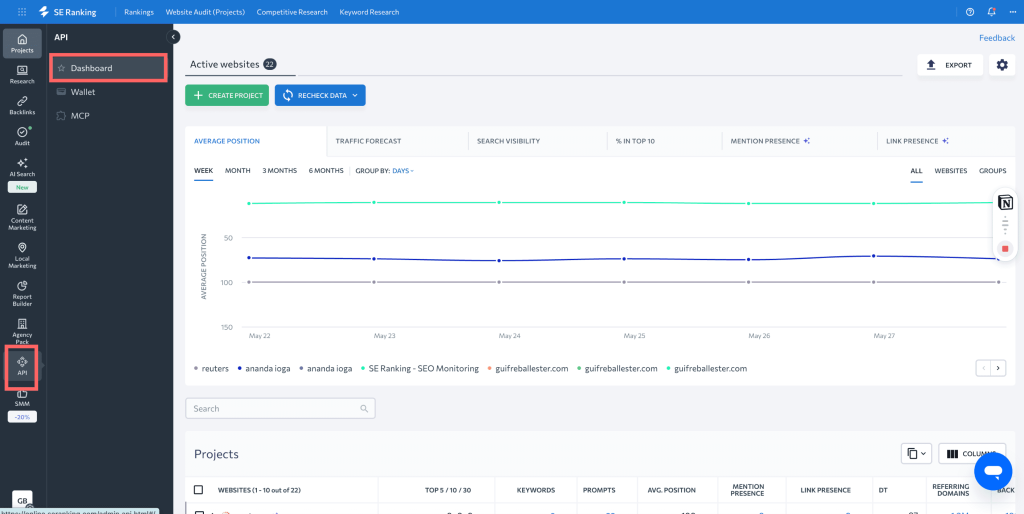
1. Navigate to the API Dashboard. Click the API icon in the main left-hand navigation menu, then select Dashboard.
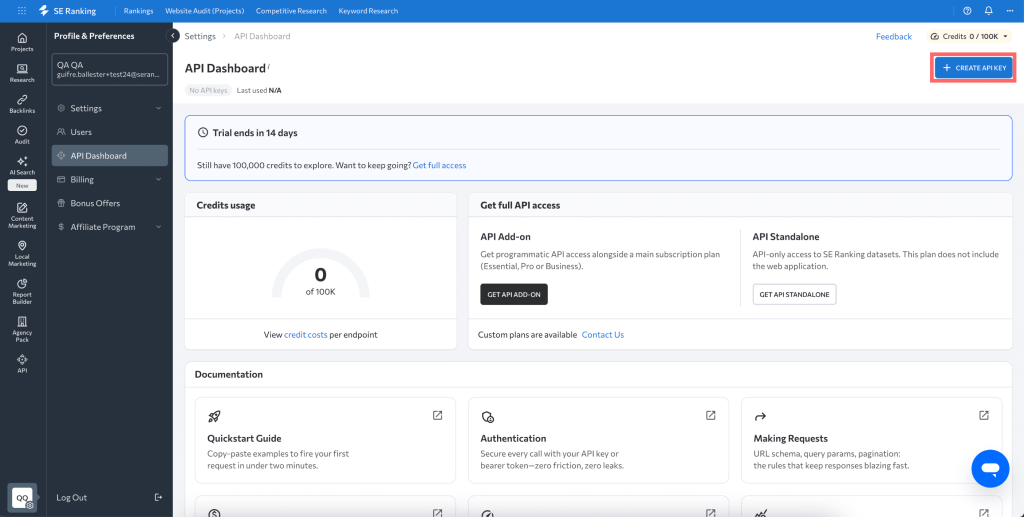
2. Click the + CREATE API KEY button located in the top-right corner.
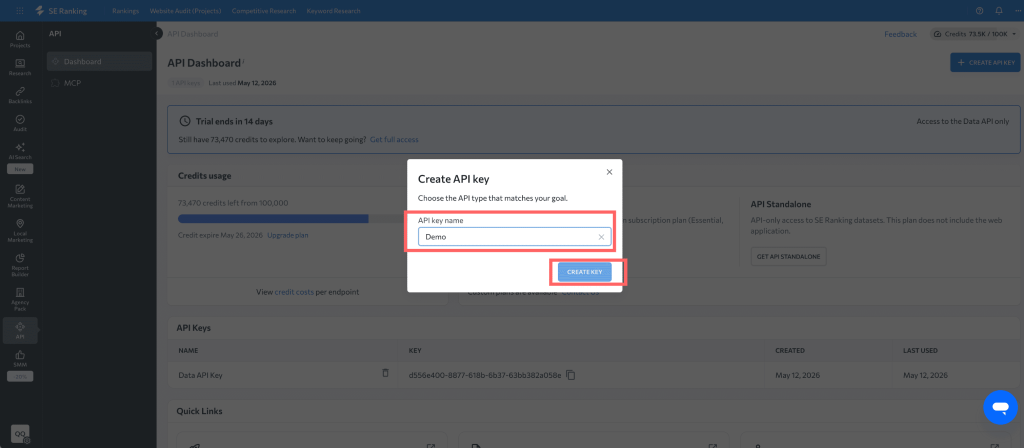
3. In the Create API key dialog box:
a. Enter a descriptive name in the API key name field (e.g., “Demo”).
b. Click CREATE KEY.
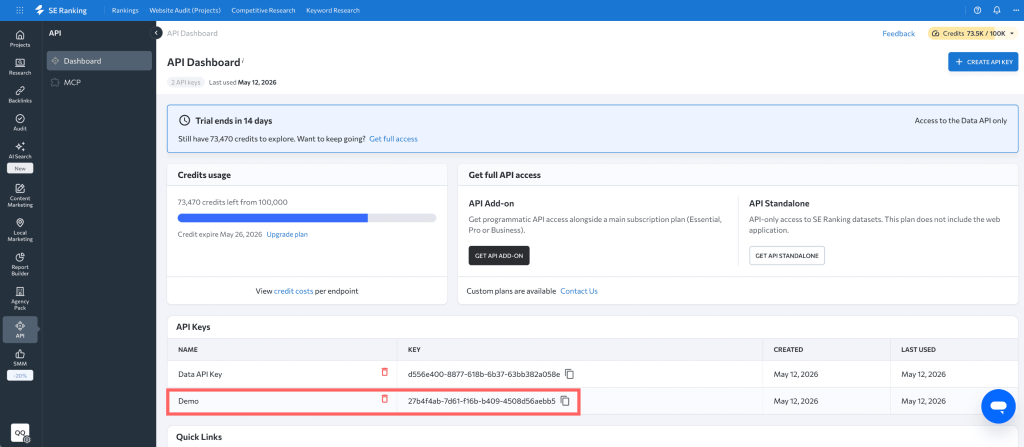
4. Your new key will be generated and listed in the API Keys table. You can create multiple API keys for different applications or environments.
Custom and enterprise solutions
If you have high-volume data needs exceeding standard plans or require a custom API solution, contact our team to discuss enterprise options, custom rate limiting, and pricing. You can reach us at [email protected].
Using your API key
Your API key is a secret token used for authentication. Keep it secure and do not expose it in client-side code or public repositories.
To authenticate your requests, include the API key in the Authorization header of your HTTP requests, using the Token scheme.
Example (cURL):
curl -X GET "https://api.seranking.com/v1/backlinks/summary?target=yourdomain.com" \

     -H "Authorization: Token YOUR_API_KEY"