API credit system
SE Ranking provides two distinct APIs: the Data API, which uses a pay‑as‑you‑go credit system for raw data retrieval, and the Project API, which uses your subscription limits for project management functionality. This guide explains how consumption is tracked and calculated for both.
To manage API usage effectively, it is important to understand how credits (Data API) and limits (Project API) are consumed.
- For the Data API, every successful call (
2xxstatus) consumes a number of credits from your balance. Failed requests (4xxor5xx) do not consume credits. Credits can be charged per record returned, or as a flat number of credits per successful request, regardless of data volume. For more information, see Unit costs. - The Project API instead consumes the limits of your SE Ranking subscription. Any action that counts against a limit in the SE Ranking platform will also do so when performed via the API.
Data API credits
The Data API operates on a flexible credit system. Standalone access starts at 24M credits annually. To purchase additional credits, visit the API Dashboard or contact us at [email protected]. For detailed guidance on accessing the API, see Getting API access.
Ensure your credit balance is sufficient before making requests. You can check your remaining credits using either of the following methods:
1. In the API dashboard:
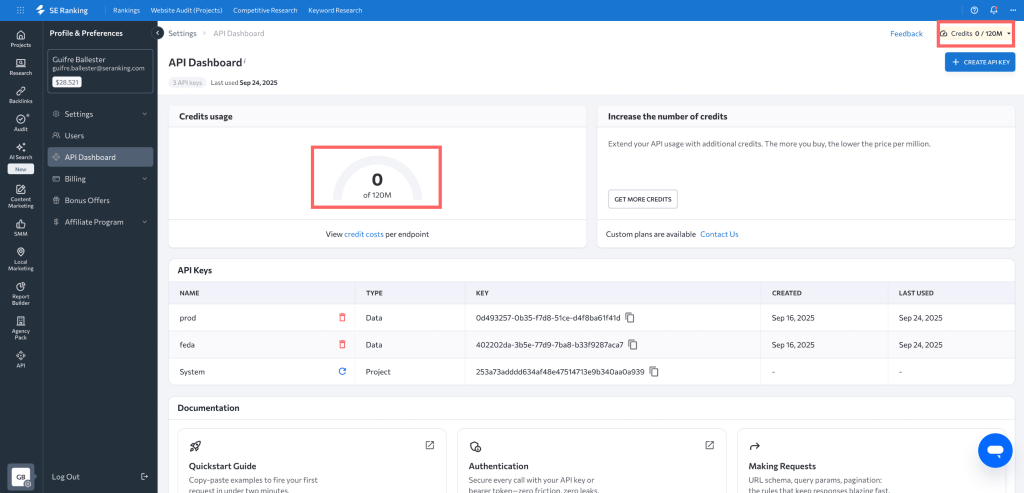
Navigate to Profile & Preferences > API Dashboard. Your current balance is displayed prominently in the Credits usage visualization and in the top-right corner of the SE Ranking interface.
2. By using an API call:
You can programmatically check your balance with the Account System API. The request costs 0 credits and returns information about your remaining API credits for the authenticated API key.
Request parameters
| Parameter | Type | Mandatory | Default | Description | Example |
|---|---|---|---|---|---|
| apikey | String | Yes | N/A | Your API key in UUID format. For more information, see Authentication. | 80cfee7d-xxxx-xxxx-xxxx-fc8500816bb3 |
| output | String | No | json | Output format (json or xml). | json |
Response parameters
| Parameter | Type | Description | Example |
|---|---|---|---|
| status | String | Current status of the API subscription plan: active, inactive, expired, or disabled. | active |
| start_date | Datetime | Subscription start date in YYYY-MM-DD HH:MM:SS format. | 2025-05-07 15:10:27 |
| expiration_date | Datetime | Subscription expiration date in YYYY-MM-DD HH:MM:SS format. | 2026-05-07 15:10:27 |
| units_limit | Long | Quota (total number of API units) for this subscription. | 50000000 |
| units_left | Long | Current API balance, i.e., number of API units left. | 123546 |
Request example (cURL)
curl -X GET 'https://api.seranking.com/v1/account/subscription' \

  -H 'Authorization: Token YOUR_API_KEY'
Response example (JSON)
{

  "subscription_info": {

    "status": "active",

    "start_date": "2024-01-18 14:20:02",

    "expiraton_date": "2024-02-18 14:20:02",

    "units_limit": 5000000,

    "units_left": 4975033

  }

}
Project API limits
The Project API uses the limits of your SE Ranking subscription plan rather than separate credits. You can check your account’s usage limits under Profile & Preferences > Billing, in the Your limits section.
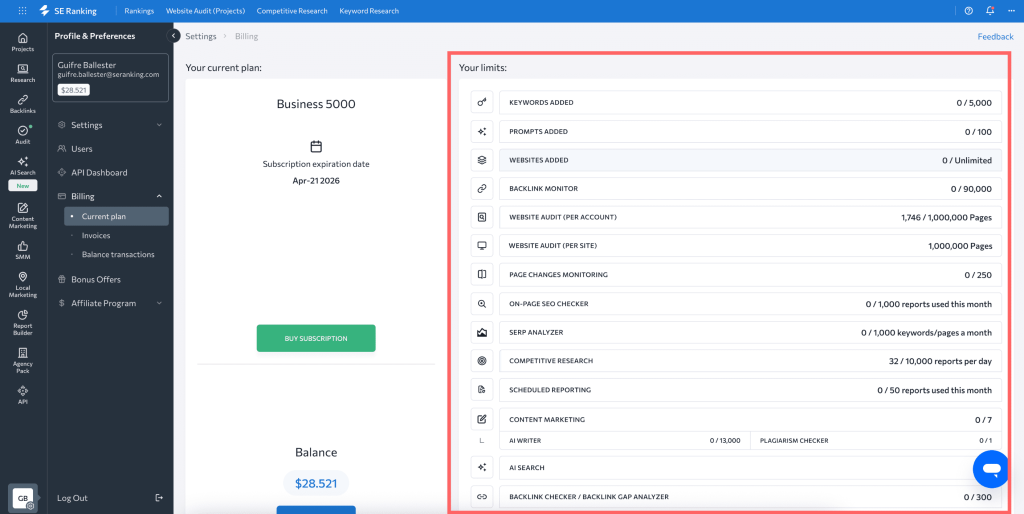
Any action that consumes a limit within the SE Ranking platform will also do so when performed via the API.
For example:
- Adding a keyword via the API counts against your plan’s Keywords added limit.
- Initiating a website audit via the API consumes pages from your plan’s Website Audit limit.
Forecasting and optimization
Forecasting Data API costs
You can check how many credits are consumed for each Data API endpoint either in the endpoint description or in the Credit costs table. Before running a large-scale workflow, forecast the credit cost to avoid interruptions:
- List the calls in your workflow.
- Multiply each call by its credit cost using the Credit costs table.
- Sum the costs for all calls.
- Compare the total with your
units_left(from/v1/account/subscription).
Cost calculation example
Suppose you need backlink summaries for 250 domains and a full export for one of them:
/backlinks/summary (cost per record):
Request data for 250 domains (250 records).
Cost: 250 records × 100 credits = 25,000 credits
/backlinks/export (cost per record):
Request data for 250 domains. These domains contain 50,000 backlinks (records).
Cost: 50,000 records × 1 credit = 50,000 credits
/backlinks/export/status (cost per request):
Check the status twice.
Cost: 2 calls × 0 credits = 0 credits
Total estimated cost: 25,000 + 50,000 + 0 = 75,000 credits
Data API errors
If your balance is insufficient for a request, the API returns HTTP 403 Insufficient funds, and no credits are charged. To replenish your balance, visit the API Dashboard or contact support at [email protected].
Response example (JSON)
{

  "error": {

    "code": 403,

    "message": "Insufficient funds",

    "description": "Your current credit balance is too low to process this request."

  }

}
Project API errors
If an action via the Project API exceeds your subscription limits, the API returns an error indicating the specific limit reached. To increase limits, visit the Subscription Page or contact support at [email protected].