The prompts you’re missing from, and the posts written to answer them
Tracking AI visibility tells you there’s a gap but it doesn’t close it. Connect the SE Ranking and Planable MCPs, and your assistant turns AI prompts into drafted posts made for the channels LLMs already pull from.

Trusted by 40,000+ agencies
Two data sets that read better together
LLMs assemble answers partly from the posts, threads and profiles they’ve read. So what you publish is an input to who gets cited.
The prompts worth acting on
The SE Ranking MCP brings the prompt gaps, the questions competitors are cited on, and where your brand is missing across five AI engines. It’s the reason a topic earns a post at all.
The channels to act in
The Planable MCP brings your channels, calendar, and how your audience engages. Drafts arrive for approval in the flow your team already runs so you can post them where LLMs read.
The gap and the answer, in one run
Whether you’re absent from the answer, mentioned without a link, or losing a prompt you used to own — it’s the same run.
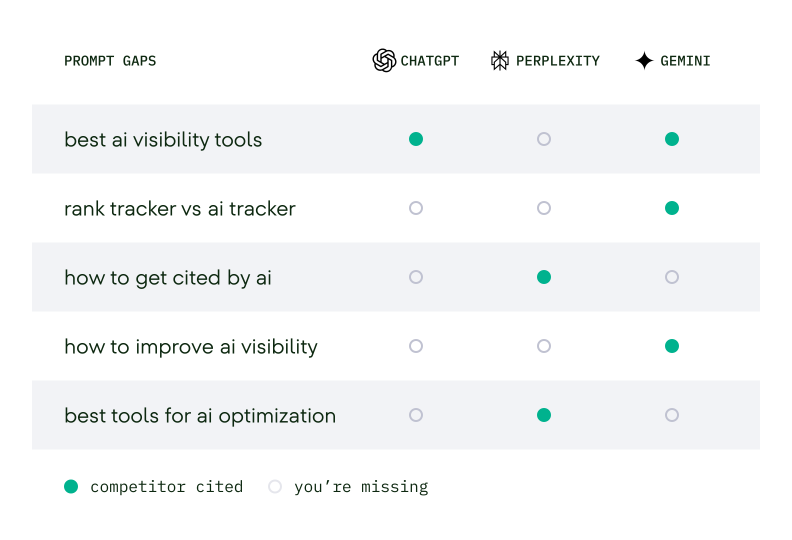
See which prompts cite a competitor and not you
SE Ranking separates prompts that cite your domain, mention the brand without a link, or cite a competitor instead. All across AI Overviews, AI Mode, ChatGPT, Gemini, and Perplexity. That’s the shortlist a campaign gets built from.
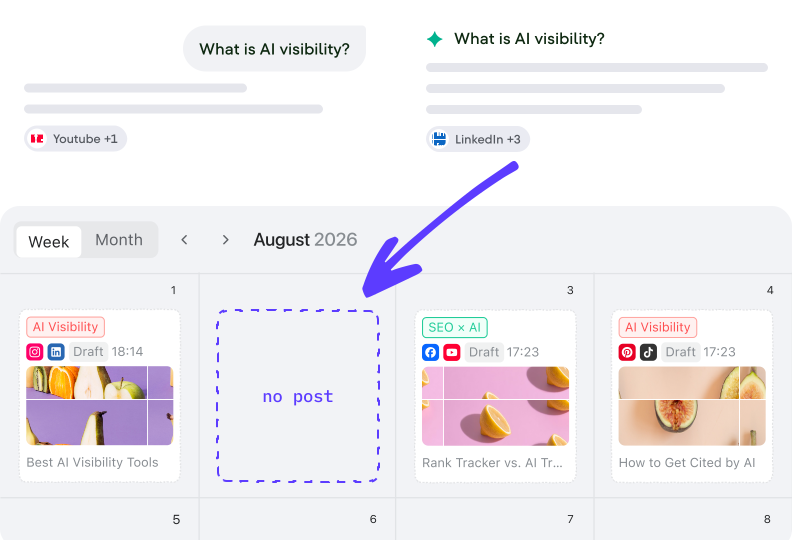
Gaps closed with drafts, not as another report
Missing and contested prompts turn into posts within Planable. Written to be quoted, adapted per channel, landing in the workspace where your team reviews. One prompt spans the diagnosis and the drafts.
Run it on the prompts you’re already losing
No credit card required
How a run goes
You describe the target in plain language. Here’s what your assistant takes in, what it reads across both products, and what it hands back.
What you give it
Type your domain and market, add two or three competitors, and specify Planable workspace with at least one connected page. Connect SE Ranking project with history for progress tracking. GA4 or GSC for on-site behavior data.
What it reads
Where your brand is mentioned and cited in AI answers and where a competitor is cited instead, across five engines. On the social side, it checks engagement on your channels (requires Planable’s Analytics add-on).
What comes back
An AI-presence read, prompts with clusters, engines, and brands cited, content and tracking plan, as well as the drafts in Planable ready. Nothing publishes itself.
Turn your AI-visibility report into a campaign that changes it
No credit card required
Grow your presence in AI answers through what you post
Visibility you move on purpose, run after run. Each pass aims your posts at real gaps, sets a baseline to measure against, and repeats for the next account.
Posts that answer a gap you can name
Every draft traces to a specific prompt, one you’re missing from or one a competitor is cited on and you’re not. Instead of briefing topics from scratch, you’re answering questions the answer engines have already been asked.
A setup you point at the next account
Once the loop runs for one domain, you can re-run it for the next client, market, or cycle. This turns a single gap analysis into a standing part of how the team works.
Visibility movements you can measure
Your AI presence is on record before you publish. It takes a project and several check cycles before a trend is readable. The baseline is what makes the comparison mean anything.
Why practitioners running SEO at scale work with SE Ranking data



Is MCP access included in my SE Ranking plan?
Yes. SE Ranking includes MCP in every plan and you can also access it during a 14-day trial.
Do I need both SE Ranking and Planable for this?
For this run, yes. SE Ranking supplies the AI visibility gaps and Planable is where the drafts land for review. Planable is sold separately, with a 20% discount when bundled with SE Ranking. With only one of the two connected, the assistant does half the motion.
What does connecting the two MCPs actually involve?
Adding both MCP servers to your AI assistant and authorising them. No coding required. Beyond that you’ll need an SE Ranking project for prompt tracking to run against, and a Planable workspace with at least one connected page for the drafts to land in.
Do I have to write the prompt myself?
No. You describe the target in plain language. Or start from the open-source skill we published for Claude, which runs the whole sequence — gap analysis, baseline, and drafts — as one command. Get the skill on GitHub →
Which AI engines does the visibility data cover?
Google AI Overviews, Google AI Mode, ChatGPT, Gemini and Perplexity. SE Ranking reports mentions and citations per engine.
How soon can I see the campaign move anything?
Not within a week. Prompt tracking needs an SE Ranking project and several check cycles before a trend can be read rather than guessed at. Set the baseline before you publish anything; the before-and-after comparison is what makes the run measurable, and that comparison needs time on both sides.
What do the drafts actually look like?
Post angles built to be cited (comparisons, FAQ-style answers, plain definitions) adapted to each channel connected in Planable and queued in your normal approval flow. They arrive as drafts, not scheduled posts, so nothing publishes without a person approving it.
Stop reporting the gap. Start closing it.
Run the gap analysis and see the drafts before you commit.
No credit card required