Generate SEO intelligence reports with SEOIntel
Live demo: seointel.vercel.app | Repository: github.com/seranking/seointel
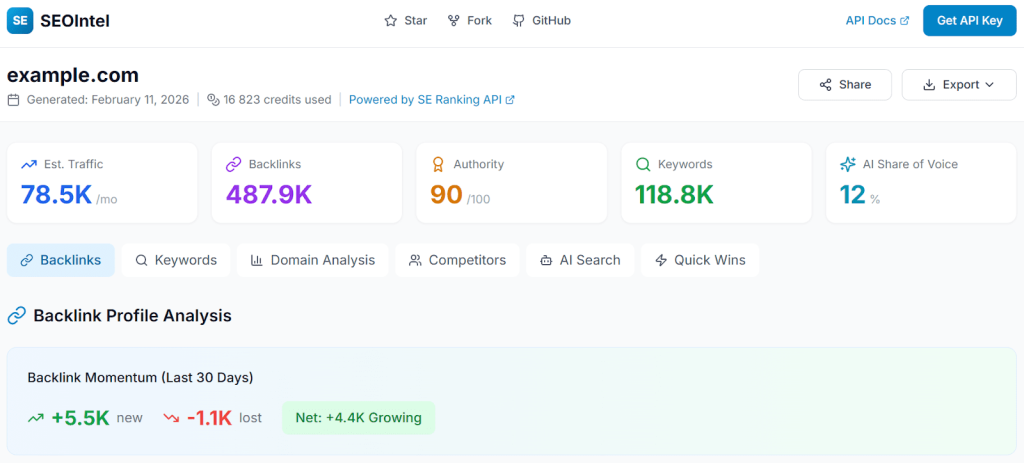
Try it now (no setup)
The fastest way to see what SEOIntel does is the hosted demo. No installation, no API key required.
- Go to https://seointel.vercel.app/.
- Enter a domain (e.g.,
example.com). - Leave the API key field empty—the tool runs in demo mode with sample data.
- Click Generate Report.
You’ll see a full report with realistic data across all seven sections. When you’re ready for live data, add your API key and re-run it.
Run it locally
Prerequisites
- Node.js 18+
- Redis instance (Upstash free tier works)
- SE Ranking API key—get one here (optional for demo mode)
Step 1. Clone and install
git clone https://github.com/seranking/seointel.git

cd seointel

npm install
Step 2. Configure environment
cp .env.example .env.localEdit .env.local with your credentials:
# Redis connection (required for report storage)

UPSTASH_REDIS_REST_URL=your-redis-url

UPSTASH_REDIS_REST_TOKEN=your-redis-token
# App URL for shareable report links (optional)

NEXT_PUBLIC_APP_URL=http://localhost:3003
Step 3. Start the server
npm run dev
Open http://localhost:3003.
Step 4. Generate your first report
- Enter a domain.
- Paste your SE Ranking API key (or leave blank for demo mode).
- Click Generate Report.
- Watch the progress stream as data is collected (30–60 seconds).
- View your report at
/report/[id].
What’s in the report
Each report is divided into seven sections. The table below shows what data you get and which API endpoints power each section.
| Section | What it tells you | Key API endpoints |
|---|---|---|
| Executive Summary | Traffic estimate, backlink count, domain authority, keyword count, AI share of voice | /domain/overview/worldwide, /backlinks/summary, /backlinks/authority |
| Backlink Profile | Authority distribution, top anchors, backlink momentum (new/lost last 30 days), top linked pages, IP concentration | /backlinks/summary, /backlinks/authority/domain/distribution, /backlinks/anchors, /backlinks/history/count, /backlinks/indexed-pages, /backlinks/referring-ips |
| Keyword Rankings | Top 20 ranking keywords, near-page-one opportunities (pos. 11–20), position distribution, SERP features, paid keywords | /domain/keywords, /domain/overview/history |
| Domain Analysis | Traffic by country, subdomain performance, top pages by traffic, anchor text distribution, paid ad activity | /domain/overview/db, /domain/subdomains, /domain/pages, /domain/ads |
| Competitive Landscape | Top 5 competitors, keyword gaps, keyword overlaps, backlink gaps, page-to-page comparisons | /domain/competitors, /domain/keywords/comparison, /backlinks/summary (per competitor) |
| AI Search Visibility | Presence in ChatGPT, Perplexity, Gemini, Google AI Overview; brand mentions vs. link citations; leaderboard rank | /ai-search/overview, /ai-search/overview/leaderboard, /ai-search/prompts-by-target, /ai-search/prompts-by-brand |
| Quick Wins | Keywords close to page 1, low-hanging fruit with effort/impact scoring, content gap opportunities, question keywords | /keywords/questions, /keywords/similar, /keywords/related, /keywords/long-tail |
Credit costs
A full report typically consumes 15,000–25,000 credits, depending on the domain’s size and competitive landscape. The biggest cost drivers:
| Operation | Approximate cost | Notes |
|---|---|---|
| AI Search Leaderboard | 7,500 credits | Single most expensive call |
| AI Search Overview | 1,800 credits | Per-market analysis |
| Domain/keyword/competitor calls | 100 credits each | ~20 calls per report |
| Backlink intelligence | 1–100 credits each | Varies by endpoint |
| Keyword research | 1–10 credits per record | Similar, related, long-tail |
The exact credit count appears in the report header after generation. Expand the Developer Info panel at the bottom of any section to see the cost breakdown per API call.
/account/subscription. If you see an “Insufficient funds” error, top up your API credits.Export your data
From the report UI
Click the Export dropdown in the report header:
- Full Report (JSON)—Complete report data as structured JSON, including all sections and metrics.
- Print/PDF—Browser print dialog for PDF export.
From individual sections
- Keywords CSV—Exports: keyword, position, volume, traffic, difficulty, URL.
- Backlinks CSV—Exports: page, backlinks, referring domains, dofollow ratio.
Backlink bulk export (API)
For large-scale backlink data, use the export endpoint directly:
# Quick sample (100 backlinks, 2 per domain)

curl -X POST http://localhost:3003/api/reports/{id}/export-backlinks \

  -H "Content-Type: application/json" \

  -d '{"action": "sample", "apiKey": "YOUR_KEY", "limit": 100, "perDomain": 2}'
# Start full async export

curl -X POST http://localhost:3003/api/reports/{id}/export-backlinks \

  -H "Content-Type: application/json" \

  -d '{"action": "start-export", "apiKey": "YOUR_KEY"}'
# Check export status

curl -X POST http://localhost:3003/api/reports/{id}/export-backlinks \

  -H "Content-Type: application/json" \

  -d '{"action": "check-status", "apiKey": "YOUR_KEY", "taskId": "TASK_ID"}'
Inspect the raw API calls
Every report includes a Developer Info panel that logs every API request made during generation. This is the bridge between “nice report” and “I can build this myself.”
For each call, you’ll see:
- The full endpoint path with parameters
- The raw JSON response
- Duration (ms) and credits consumed
- A copy button for quick reuse
This is the fastest way to understand which SE Ranking endpoints to call and what the responses look like before writing your own integration.
Operational limits
| Limit | Default | Notes |
|---|---|---|
| API rate limit | 5 requests/second | Configurable in lib/seranking.ts. Contact [email protected] for higher limits. |
| Report timeout | 300 seconds | Serverless function limit for large domains. |
| Report retention | 2 days | Redis TTL, configurable in lib/report-store.ts. |
| Redis commands | 500,000/month | Upstash free tier. SEOIntel uses ~2 commands per report. |
Troubleshooting
| Issue | Cause | Solution |
|---|---|---|
| “Insufficient funds” | API credits depleted | Check the balance at the SE Ranking API dashboard. |
| Report times out | Domain has extensive data | Reduce maxDuration or check network latency. |
| Redis connection fails | Wrong credentials | Verify UPSTASH_REDIS_REST_URL and UPSTASH_REDIS_REST_TOKEN in .env.local. |
| Progress stalls mid-report | SSE connection dropped | Check the browser console for errors; refresh and retry. |
| Rate limit errors (429) | Too many concurrent reports | Wait and retry. The built-in rate limiter handles this automatically. |
Next steps
Use the API directly. The Developer Info panel shows you the exact calls SEOIntel makes. Pick an endpoint and try it with curl:
curl -X POST https://api.seranking.com/v1/domain/overview/db \

  -H "Authorization: Bearer YOUR_API_KEY" \

  -H "Content-Type: application/json" \

  -d '{"domain": "example.com", "source": "us"}'
Fork and customize. SEOIntel is MIT-licensed. Common customizations:
- Add your agency branding to
app/layout.tsx - Add new API endpoints in
lib/seranking.ts→ call them fromlib/report-generator.ts→ display incomponents/Report/ - Change report retention by editing
REPORT_TTLinlib/report-store.ts - Modify chart styles in
components/Charts/
Run the tests to understand expected behavior:
npm run test:run