Assess AI search visibility
How visibility is assessed
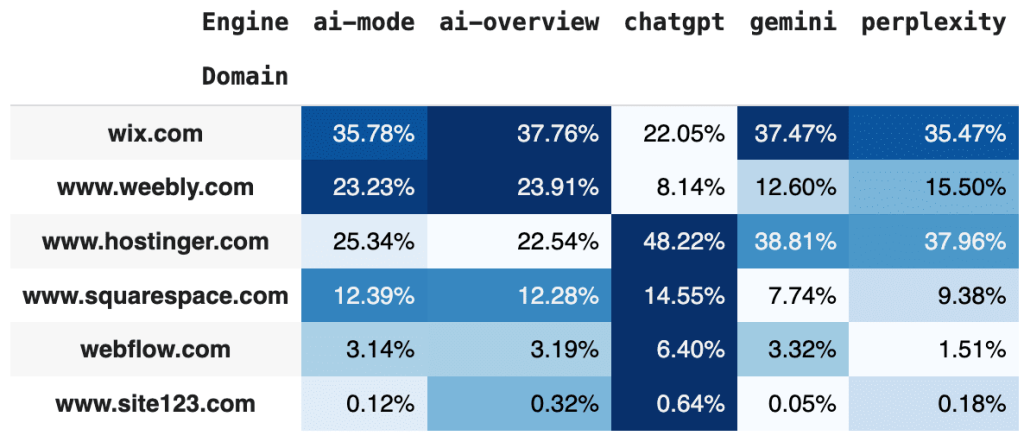
The visibility we measure comes from a subset of all possible prompts tracked by SE Ranking, which we call the SE Ranking AI Search universe. This means the absolute numbers are most meaningful when comparing domains within this set of scanned prompts. For example, if wix.com appears in 100 prompts and hostinger.com in 78, it shows that Wix is currently leading in AI Search visibility.
Once you run the notebook, you can view your brand’s visibility in two main ways.
1. Where your brand is underperforming on different AI engines:
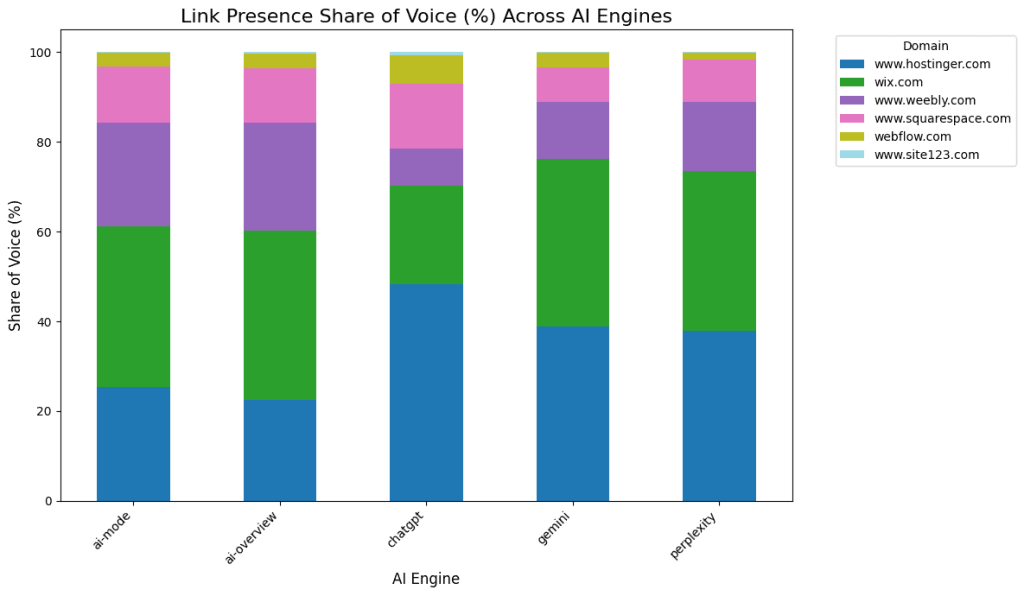
2. How you compare to competitors:
Prerequisites
- An API key available in your SE Ranking account
- A Google account to open and run the notebook in Google Colab
- Optional: A list of your main competitors (domain + brand name)
Notebook overview
The notebook automatically connects to the SE Ranking AI Search API to collect and process visibility data, so no manual API setup is required. The workflow consists of seven key steps. You only need to configure Step 2 (Main configuration); the rest runs automatically.
To get started, open the Colab file: AI_Share_of_Voice_Analysis. Next, we’ll walk you through the main steps to provide an overview.
Step 1. Setup and installation
The step installs the required Python libraries (pandas, tabulate, matplotlib, and seaborn) and imports the necessary modules.
Step 2. Main configuration (required)
Here, you configure your main parameters:
API_KEY: your SE Ranking Data API key.SOURCE: country code (‘us‘, ‘uk‘, ‘de‘, etc.).ENGINES: list of AI search engines to analyze (‘ai-overview‘, ‘chatgpt‘, ‘perplexity‘, ‘gemini‘, ‘ai-mode‘).TARGET_CONFIG: your domain and brand.MANUAL_COMPETITOR_CONFIG: up to 5 competitor domains and brand names (or setNonefor auto-discovery).
Step 3. Detailed prompt extraction configuration (optional)
The step enables downloading the actual prompts (queries) that triggered mentions or links in AI answers.
Step 4. Load core functions and logic
The step loads the backend functions responsible for:
- Making API calls to the SE Ranking Data API
- Aggregating and processing the data
- Calculating Share of Voice metrics
Step 5. Load presentation and visualization logic
This step generates:
- Summary tables
- Charts (visibility share by brand and engine)
- CSV exports
Step 6. Run the analysis
This step executes the workflow:
- Identifies brands and competitors
- Fetches summary counts from all selected AI engines
- Optionally fetches detailed prompts
- Calculates Share of Voice
- Displays charts and tables
- Saves results as CSVs
Step 7. Download results
This step downloads the generated CSV files:
- Overall Share of Voice by AI engine and competitor
- Detailed prompts (if extraction enabled)
Next steps: Define opportunities
After running the notebook, you can take a deeper look at topics where competitors dominate:
1. Open the generated .csv file with detailed prompts (ideally 100+ prompts per brand and AI engine).
2. Use an LLM (e.g., ChatGPT or Gemini) to categorize each query into themes.
3. Aggregate mentions by topic to find where competitors appear more often.
Example prompt for topic classification:
Categorize the following 100 search prompts by topic or intent (e.g., SEO, design, e-commerce). Return the top 10 categories with counts.